 AMIGASYSTEMDistro Maintainer
Posted
7 days ago
AROS 64-bit v11 Port by StackAttack by Georg Steger StackAttack2 by Amiga Version
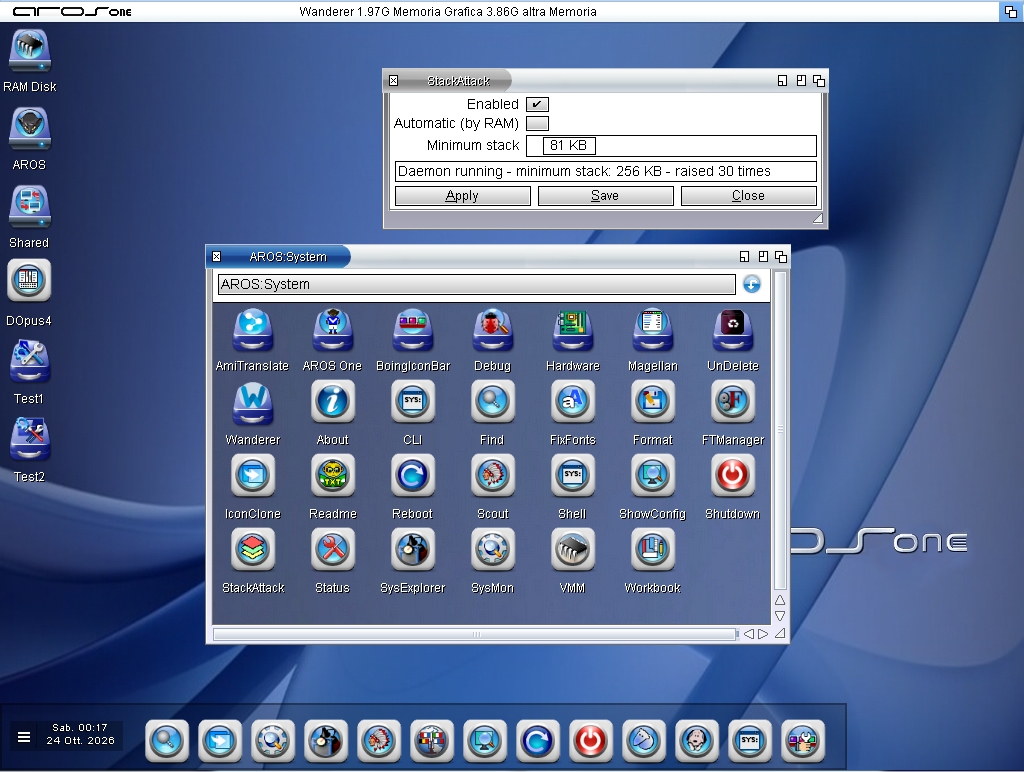
StackAttack is a small daemon that removes Gurus from stacks that are too low; you no longer need to set the stack on the icons. You can set the stack manually or let StackAttack do it automatically.
It patches CreateProc, CreateNewProc, RunCommand, and SystemTagList to ensure every new process has at least the selected minimum stack size (16 KB–1 MB), even after the system has already booted.
StackAttack has an automatic mode based on RAM. In the AROS version, it features a Zune GUI for configuring, applying, and saving preferences.
The settings are saved and loaded at startup via ENVARC: the line to use in user-startup is StackAttack DAEMON.
Silent startup, no additional patches required with each change, and a counter showing how many times the stack has been raised.
Limitations: the patch cannot be removed without restarting; the minimum applies to all programs (there is no per-program list yet); and it does not read the stack size specified by the icon or executable.
StackAttack supports multiple languages through catalog files; the archive will include Italian, French, German, Spanish, and Polish.
You do not have access to view attachments
AMIGASYSTEMDistro Maintainer Posted
4 days ago@amigamia
I'm attaching StackAttack for anyone who wants to try it before it's released. It has been tested with OWB, Photocraft, PDFCraft, Wordcraft, and Deckcraft using a standard stack size of 8192; the applications listed launched without causing a Guru.
I cannot guarantee it will work for applications with “unresolvable” high stack requirements—where even an extremely high stack size fails to get them to launch.
I’ve also compiled StackAttack for AROS 32-bit and 68k.
Summary of how to install it if you want to use the system's automatic stack
- Copy StackAttack + icons to the System folder, Prefs folder, or wherever you want
- In user-startup, add the StackAttack DAEMON command (if you're using specific paths, include the path in the command)
Run StackAttack, check the “Automatic (By RAM)” box, and save
Restart and try running an application that requires the stack of course, first reset the stack to its default in the Tooltypes icon.
You do not have access to view attachments

 amigamiaAdmin