Oh no! Where's the JavaScript?
Your Web browser does not have JavaScript enabled or does not support JavaScript. Please enable JavaScript on your Web browser to properly view this Web site, or upgrade to a Web browser that does support JavaScript.

Dopus5 Magellan v5.101 AROS version 32/64Bit Released

Last updated on 18 hours ago
AMIGASYSTEMAMIGASYSTEMDistro Maintainer
Posted 9 days ago
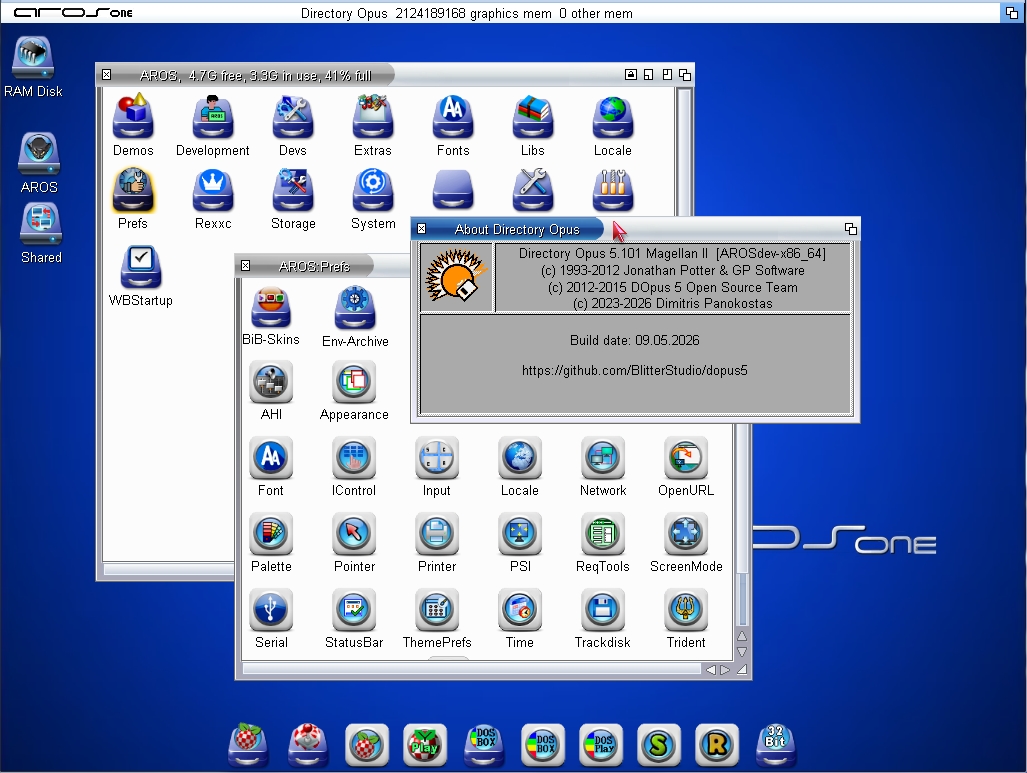
Dopus5 Magellan v5.101 is available in both 32-bit and 64-bit versions; I’ve included a download link below!

On AROS One, you’ll find a complete configuration and AROS One-style images. On AROS One, you can choose to replace Wanderer with Dopus5 via ArosOnePrefs, or use Dopus5 as your file manager!

Italian localisation is now available on AROS One!

https://github.co.../tag/5.101
Signature: AROS One All Thread
AROS One Home Site
AROS One Facebook
retrofaza, Deremon, deadwood, Amiwell79, miker1264
AMIGASYSTEM attached the following image:
dopus5-v5101.jpg dops5-v101.jpg
M
miker1264Software Dev
Posted 9 days ago
Awesome! That's what I've been waiting for, Dopus Magellan x86_64.

That's a HUGE improvement. :-)
AMIGASYSTEMAMIGASYSTEMDistro Maintainer
Posted 9 days ago
In the 64-bit version, I have encountered and reported three minor issues; in the 32-bit version, there are currently no issues

https://eab.abime...stcount=86
D
deadwoodAROS Dev
Posted 8 days ago
This is wonderful news. Hopefully it will allow more people to migrate to 64-bit!
nikosnikosDistro Maintainer
Posted 8 days ago
This is fantastic news! Looking forward to try it out.f
nikosnikosDistro Maintainer
Posted 5 days ago
Quite unstable unfotunately. Tried native 64-bit version. I read there are some minor bugs but they do not seam minor to me. Sorry for bad bug report.
AMIGASYSTEMAMIGASYSTEMDistro Maintainer
Posted 5 days ago
Nikos, what instability have you encountered? If the issues are different from those I’ve encountered or those reported on GitHub, please report them to the developer:

https://github.co...us5/issues
nikosnikosDistro Maintainer
Posted 4 days ago

AMIGASYSTEM wrote:

@AMIGASYSTEM - Nikos, what instability have you encountered? If the issues are different from those I’ve encountered or those reported on GitHub, please report them to the developer:

https://github.co...us5/issues


My time is limited but I will try to do that.
J
Jeff1138Member
Posted 1 day ago
Hi,

FYI. Put a few in just now
AMIGASYSTEMAMIGASYSTEMDistro Maintainer
Posted 1 day ago
Jeff1138, I don’t have the issues you’ve reported regarding the display of PNG images and copying to RAM (see my attached video); there are probably issues with your Dopus5 configuration!

I’ve attached a video: my 64-bit Dopus5 doesn’t have those problems; I’m using my own custom configuration!

https://youtu.be/...
J
Jeff1138Member
Posted 22 hours ago
Hi,

Thanks, very weird as I cannot do any of that. Are you using your own compiled or 5.101 from the github?

PNG works on Aros 32bit and I did not set that up so expected the same on Aros 64bit.

I using on AMD native which could explain a lot from VMware.
Midwan is testing on a VM as well, so thought a native install may be different. Appears it might be.
Edited by Jeff1138 on 17-05-2026 03:23, 22 hours ago
AMIGASYSTEMAMIGASYSTEMDistro Maintainer
Posted 20 hours ago
I don’t think there are any differences between native hardware and VMware; I usually don’t find any differences, but I’ll run a test to check.

The version of Dopus5 v101 I’m using is the same as yours, i.e. the one from GitHub (there are no other versions).

I tested the default settings instead of my own, and PNG images as well as other image formats are displayed and copied correctly.

Which operating system are you using?

Please note: with Dopus5, if you click on images via their icons, these are associated with the operating system’s defaults and will use the tool set in Tooltypes (on Aros One 32-bit, the tool is set to ‘PixieView’, whilst on Aros One 64-bit it is ‘Multiview’)

If, however, you click on images in ‘Details’ view in Dopus5, Dopus5 will use the tool set in FileTypes and ignore the tool set in Tooltypes.

The same applies to other file types; for example, archives opened via the icon will be extracted by ZuneARC, whilst those opened in the details view will be extracted by XADOpen.
J
Jeff1138Member
Posted 20 hours ago
Hi,

I am using a slightly newer experimental beta one as midwan fixed the dopus5 screen title bar so that memory figures are correct and the time / date now shows

I am still using an older 1.2 64bit. I am also using AMD hardware so I am expecting to be different from all others like Intel.

I wonder what NATIVE version Nikos is using?
Edited by Jeff1138 on 17-05-2026 05:04, 20 hours ago
AMIGASYSTEMAMIGASYSTEMDistro Maintainer
Posted 20 hours ago
Could you please provide a link to download the correct version so that I can test it? Thanks

By ‘NATIVE’, I think you mean the hardware being used

If you’re using AROS One 1.2 64-bit, I’d recommend installing version 1.3, which includes numerous fixes and improvements!
J
Jeff1138Member
Posted 20 hours ago
Hi,

https://github.co...issues/128

at the end of this thread (take care as it might overwrite stuff you might have setup already) and yeah what inside hardware to see if there are any more information we can learn
AMIGASYSTEMAMIGASYSTEMDistro Maintainer
Posted 19 hours ago
OK, I’ve tested the fixed version; the memory is now displayed correctly. There are no issues with viewing or copying images, but the bug I reported regarding the Guru error caused by XADOpen remains (it works fine on the 32-bit version).
As for the settings, there are no issues; in the build, I’ve replaced the default settings with my own (which are more comprehensive for the file types to be managed).
J
Jeff1138Member
Posted 19 hours ago
Midwan has fixes the XAD issue but it will appear in the next release. If not we let him know via the issues on github.

https://github.co.../issues/90
Edited by Jeff1138 on 17-05-2026 06:34, 18 hours ago
AMIGASYSTEMAMIGASYSTEMDistro Maintainer
Posted 18 hours ago
Thanks. I’ve come across another issue today, albeit a rare one: basically, if you overwrite a file, the Guru appears. However, this has only happened with one file so far; I need to check if it happens with other files as well!
You can view all discussion threads in this forum.
You cannot start a new discussion thread in this forum.
You cannot reply in this discussion thread.
You cannot start on a poll in this forum.
You cannot upload attachments in this forum.
You can download attachments in this forum.
Users who participated in discussion: nikos, deadwood, AMIGASYSTEM, miker1264, Jeff1138