AMIGASYSTEMDistro Maintainer
Posted
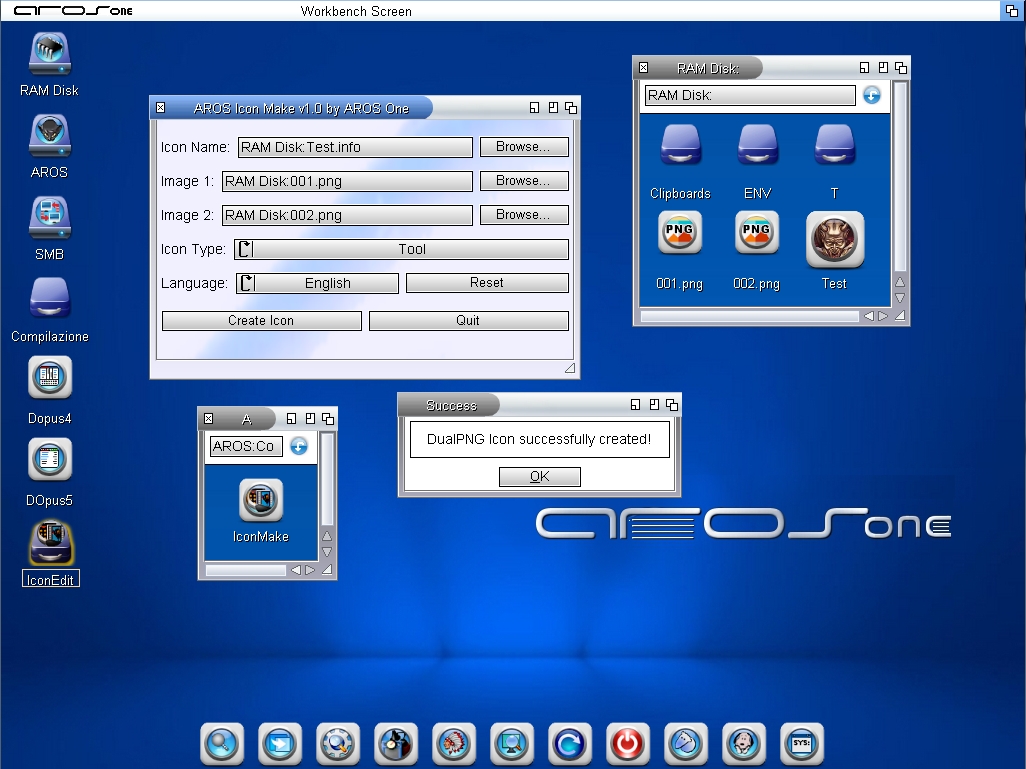
11 days agoI created IconMake for AROS 64-bit v11, which allows you to create a DualPNG icon by merging two PNG files.
IconMake was developed with some difficulty in collaboration with I.A. I would have liked to add features such as icon resizing or the addition of a glow effect, but this proved too complicated for I.A. In my opinion, there is far too little information online on how to create an icon editor for AMIGA/AROS.
However, the application is useful for creating DualPNG icons for all AROS platforms, AMiGA OS3, AMiGA OS4 and MOS – provided that the two PNG images are ready and of the same size, and perhaps already feature a glow to produce icons in the style used by AROS One.
As always, the source code will be available, and anyone can use it to improve the programme further.
Edited by AMIGASYSTEM on 07-08-2026 08:25,
11 days ago You do not have access to view attachments
Well done!
That's my area of specialty :-)
Although I have already done it, adding a glow border isn't as easy you might think. It involves Edge Detection and parallel offsets and a Gaussian Blur Effect for the glow.
It may be possible to produce a simple blur using a Gaussian Function for a nice neon effect.
I'd be glad to share some sample code to show how it can be done.
Edited by miker1264 on 07-08-2026 10:58,
11 days agoAMIGASYSTEMDistro Maintainer Posted
11 days agoYeah, maybe I can try showing it to I.A. and see if they can apply it to my GUI—though I don't think they'll be able to.
It should be very easy to integrate into your GUI and you shouldn't need AI for that. Maybe AI could help you improve the functions involved.
There are just a few functions performed in sequence to produce the 32bit ARGB Glow Border.
They are as follows:
1. Detect Contour (Edge Detect to get Graphics Path),
2. Draw Glow Mask (perform Parallel Offsets with Color Bands),
3. Do Blur Effect (Gaussian Function),
4. Combine Images (Copy Icon Image on top of Glow Border).
I can help with the code integration.
Under "Icon Type" add another Cycle Gadget "Glow Type". Fill it with Glow Boder Colors such as Red Glow",Yellow Glow" ... & last item "No Glow Border". Easy to do.
Edited by miker1264 on 07-08-2026 13:18,
11 days agoAMIGASYSTEMDistro Maintainer Posted
11 days agomiker, I'm not a developer, and I'd never be able to do what you described—and I don't think even AI could do it either. AI helps by gathering information from the web, but in this field and for this OS, there's no information or source code to examine.
If it’s not too complicated, I can send you the source code and you can finish it—I’d be very happy if you did. Maybe we can give it a different name and leave this GUI as is.
AMIGASYSTEMDistro Maintainer Posted
11 days agomiker, sorry, I didn't see your PM until later. I'm attaching the IconMake code, 3 PNG images, and the corresponding icons created for ArosOne.
You do not have access to view attachments
AMIGASYSTEM
Here is a slightly modified version where I added the Cycle Gadget to select Glow Color. Default is Yellow.
Now I have to work on my AddGlow Functions & Icon Builder Program to get it to work with AROS One Icons.
Then I can integrate the functions to add colored glow borders to images.
Edited by miker1264 on 07-08-2026 23:50,
11 days ago You do not have access to view attachments
AMIGASYSTEMDistro Maintainer Posted
11 days agoI had also added the same “Glow” tab next to “Volume,” but then the Glow feature never worked.
I noticed that the translations have been messed up the tab titles are wrong—and in the French version, there are strange fonts. What editor are you using?
In the screenshot (the second one), you can see how the tab titles were arranged.
You do not have access to view attachments
AMIGASYSTEM
This is a test version.
You will have to add the new Translation Items for the other languages other than English. I only added new items to English.
There is a new text label and cycle gadget text and cycle items that don't appear in the other languages. Any language other than English will be messed up. So use English. :-)
If you'd like you can modify the Italian Translation by adding the new text items. I would have to use Google for that. I don't speak Italian.
How about "Colore Luminoso" ? That's longer than "Glow Color". How about "Bagliore Rosso" ? "Red Glow"? You can add the rest of it.
The GUI won't matter much if the Add Glow Functions for Icons don't work with your icons. I'm working on that part. The blue drawer icons you sent have an orange glow border so I'll match that then the other colors.
Edited by miker1264 on 08-08-2026 11:46,
10 days agoAMIGASYSTEMDistro Maintainer Posted
10 days agoOkay, regarding the translation, I’ll take care of fixing them myself. AI takes 1 second to translate a text or phrase into many languages.
On AROS One, I use Glow only for the drawer icons and disk icons. For apps with a white background, I don’t use Glow, but instead use an image with a different color than the first image usually an ochre yellow that creates an internal glow effect.
AMIGASYSTEMDistro Maintainer Posted
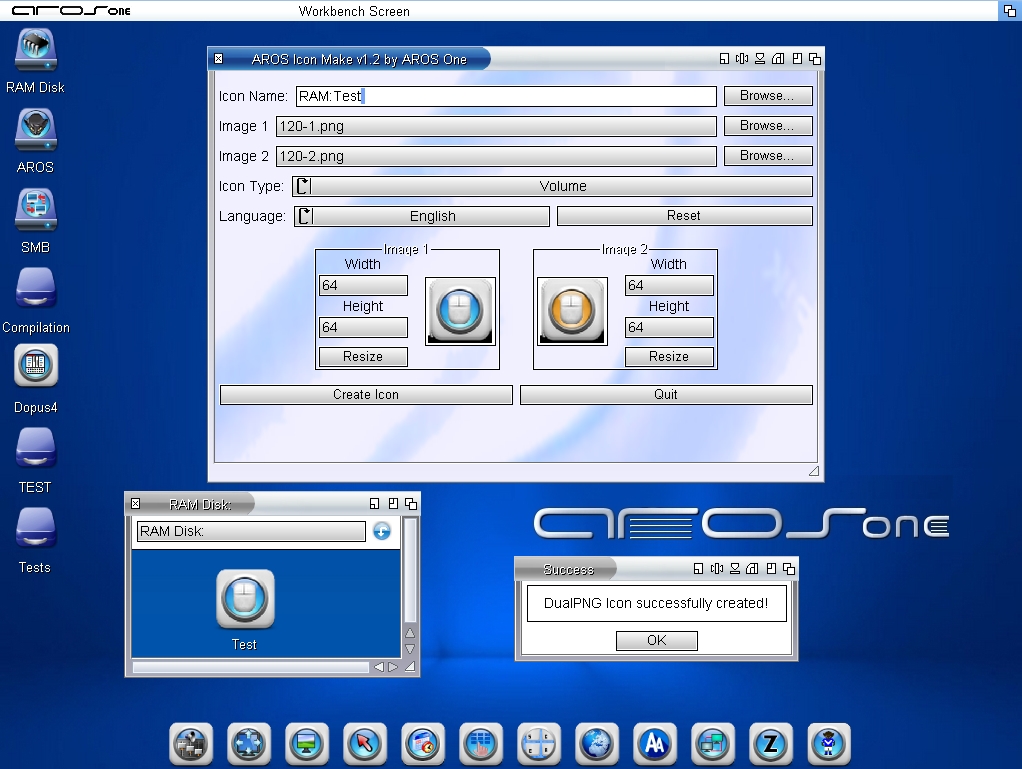
13 hours agoI've improved IconMake, now you can resize PNG images and preview them; the GUI automatically recognizes image sizes, as shown in the attached screenshot.
IconMake will also be available in an AROS 68k version—I've tested it, and it works great!
I also tried adding some graphic effects like Glow, Shadow, and others, but despite many tests, the AI wasn’t able to produce good results, the Glow effect was blurry and partially colored. If anyone wants the source code with these graphic effects, feel free to ask me for it.
You do not have access to view attachments
AMIGASYSTEMDistro Maintainer Posted
6 hours agoThe 32-bit AROS version is also ready, and later I'll compile the AROS 68k version as well.
You do not have access to view attachments