
Oh no! Where's the JavaScript?
Your Web browser does not have JavaScript enabled or does not support JavaScript. Please enable JavaScript on your Web browser to properly view this Web site, or upgrade to a Web browser that does support JavaScript.

Setup wifi

Last updated on 3 hours ago

CoolCat5000CoolCat5000Member
Posted 1 day ago
Hi, i would like to test the wifi driver, how is supposed to be configured? can someone guide me on how to setup it?

Thanks in advance,
N
ntromansVeteran Member
Posted 24 hours ago
Is this or seeting up the network prefs for wifi or something ore specific to do with the driver itself. Is this for the Pi?

Cheers,
Nigel.
AMIGASYSTEMAMIGASYSTEMDistro Maintainer
Posted 24 hours ago
[quote name=CoolCat5000 post=13801]@CoolCat5000 - Hi, i would like to test the wifi driver, how is supposed to be configured? can someone guide me on how to setup it?

Thanks in advance,[/quote]

- Make sure you have selected the device supported by your Wi-Fi card
- Go to the ‘Wireless Network’ tab
- Manually enter the Wi-Fi network details and password (see my screenshot for an example)
- The network should work straight away
- If it doesn't work, try restarting AROS

https://www.arosworld.org/infusions/forum/attachments/wifi_1.jpg
[url=https://www.arosworld.org/infusions/forum/index.php?viewforum&forum_id=16][b]AROS One All Thread[/b][/url]
[url=https://sites.google.com/view/arosone][b]AROS One Home Site[/b][/url]
[url=https://www.facebook.com/profile.php?id=100095334408019][b]AROS One Facebook[/b][/url]
CoolCat5000CoolCat5000Member
Posted 22 hours ago
Hi, it is for the pi.

I found the way that @AMIGASYSTEM is saying, but i didnt liked the idea of the manual entering (asked myself about the network scan)

The other way would be type c:wirelessmanager that i need to read a prefs that doesnt exists and edite a parameter (the device and unit i think)

So i started to think that i was doing something wrong as i would expect something easier and more user friendly.

Regards,
Edited by CoolCat5000 on 26-08-2026 20:24, 22 hours ago
AMIGASYSTEMAMIGASYSTEMDistro Maintainer
Posted 16 hours ago
AROS includes a feature for scanning Wi-Fi networks called Wireless Manager. If you have a supported Wi-Fi adapter, you’ll see its icon in Wanderer; see the screenshot.

If you don’t see the Wireless Manager icon at first, once you’ve configured the device, simply save the Wi-Fi configuration even if it’s empty. This will create the Wireless.prefs file in the Env-Archive/SYS directory, and you’ll automatically see the Wireless Manager icon in Wanderer.
[url=https://www.arosworld.org/infusions/forum/index.php?viewforum&forum_id=16][b]AROS One All Thread[/b][/url]
[url=https://sites.google.com/view/arosone][b]AROS One Home Site[/b][/url]
[url=https://www.facebook.com/profile.php?id=100095334408019][b]AROS One Facebook[/b][/url]
AMIGASYSTEM attached the following image:
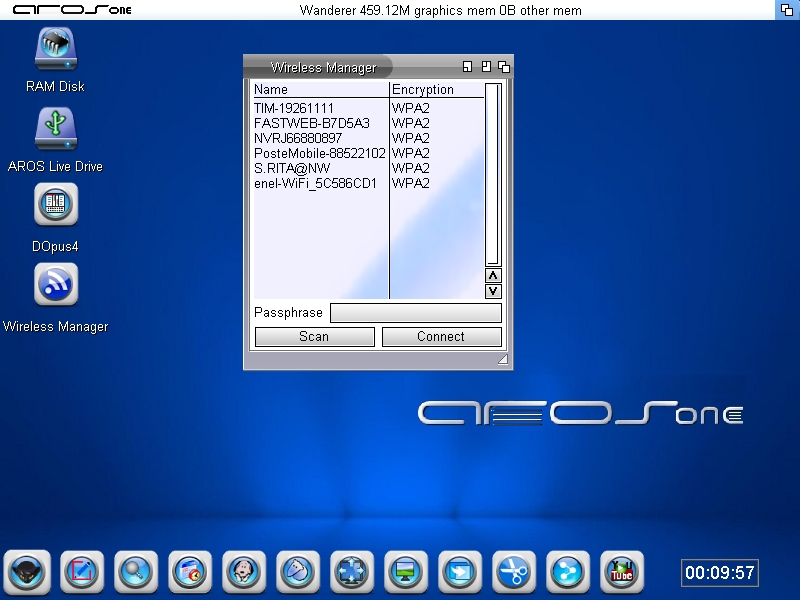
wirelessmanager.jpg
CoolCat5000CoolCat5000Member
Posted 6 hours ago
Thanks @AMIGASYSTEM ,

Now at least i know what iam supposed to look for. 🙂
B
BohunMember
Posted 3 hours ago
I have 3 access points at home with the same SSID, and phones, Macs, and Windows computers see them as one. Only when I drill down into the details do I see there are multiple access points. Wireless Manager shows them in three lines. This would make sense if it showed signal strength. I could select the closest one with the strongest signal. Now I can only choose blindly. Maybe this is worth improving.
You can view all discussion threads in this forum.
You cannot start a new discussion thread in this forum.
You cannot reply in this discussion thread.
You cannot start on a poll in this forum.
You cannot upload attachments in this forum.
You can download attachments in this forum.
Users who participated in discussion: AMIGASYSTEM, ntromans, CoolCat5000, Bohun