AMIGASYSTEMDistro Maintainer
Posted
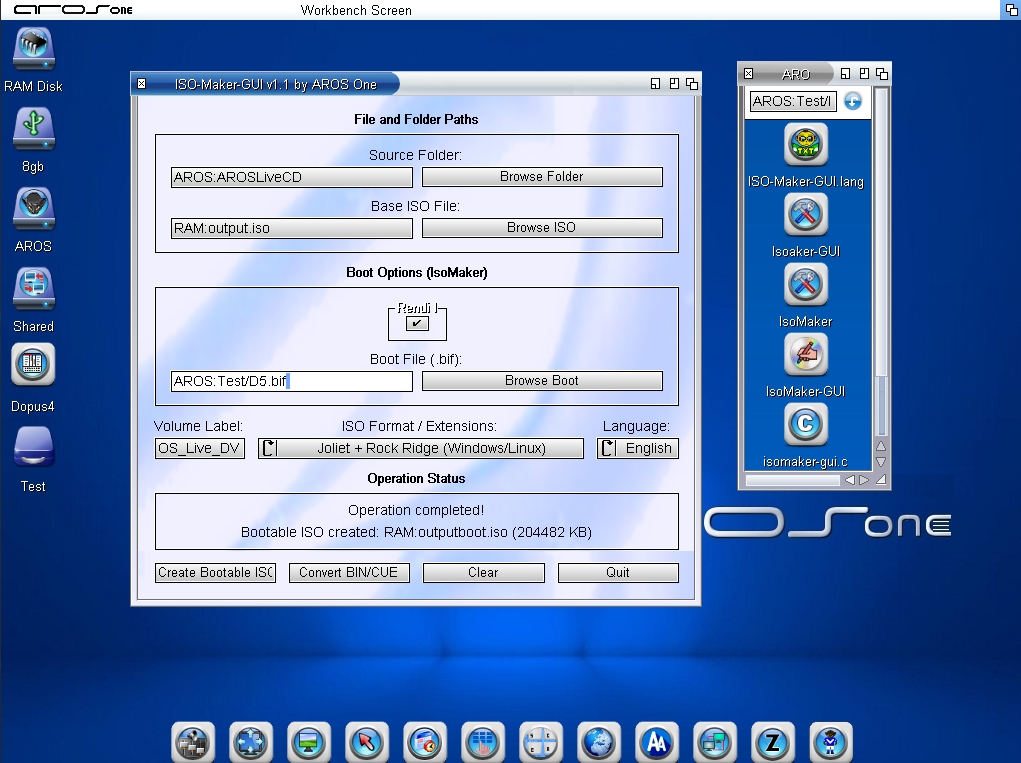
12 days agoI have created a GUI using the ‘mkisofs’ and ‘IsoMaker’ tools to create bootable ISO images for AROS.
Unfortunately, although the GUI works very well, the version of mkisofs (I have compiled two versions: 1.1.3 and 1.2.5) is too old and has some flaws. I tried compiling versions 2.1 and 3 of mkisofs; I was unable to compile version 2.1, and whilst I did manage to compile version 3, it crashes. An expert in the field advised me that compiling these two versions for AROS
was too complicated and advised me not to proceed.
ISOs can also be created with Joliet, Rock Ridge and Amiga extensions; it is possible to add the AROS bootloader (.bif) to ISOs – even those created previously – and make the CDs/DVDs bootable.
ISO-Maker-GUI uses IsoMaker – a small programme I created with the help of I.A. – to generate a bootable ISO; ISO-Maker-GUI also allows you to convert an ISO to BIN/CUE.
As mentioned, the age of mkisofs brings with it certain drawbacks: it cannot create ISOs if there are empty folders or folder names containing spaces; the source files will be included. If anyone manages to compile version 3 of mkisofs or another equivalent engine, it would be most welcome.
You do not have access to view attachments
Sorry, where do you get the source code of versions 2.1 or 3 from? Just for curiosity...
AMIGASYSTEMDistro Maintainer Posted
11 days agoThe mkisofs 1.11.3 available in the AROS archives is 32-bit and does not include the source code; in any case, it does not work well with my GUI, whereas the v1.11.3 I compiled myself works better.
There are numerous versions of mkisofs available online: v1.11.3, v1.12b5, v1.13, v115a2
I’ve compiled both v1.11.3 and v1.12b5 for AROS 64-bit v11; porting versions v1.13 and 115a2 to AROS was too complicated, and I.A. advised against it.
In my opinion, version 3.x would be ideal to port to AROS 64-bit v11
On Amiga OS4, version 2.0 is available without source code, but it seems there have been issues; on no Amiga OS is there a GUI that supports mkisofs.
In any case, my GUI is useful for creating ISOs; you just need to avoid using empty folders or text formats not supported by the chosen file system.
Indeed I found their versioning a bit confusing... 1.13 -> 2.0 and 1.15 -> 3.0 ?
AMIGASYSTEMDistro Maintainer Posted
11 days agoIt's not confusing or chronological, the versions follow one another in ascending order! Keep in mind that the 1.x versions are from the '90s.
Did you get v1.2.5 from the same SourceForge page? I can't find it...
AMIGASYSTEMDistro Maintainer Posted
11 days ago1.2.5 ? Maybe you meant to look for mkisofs v1.12b5, why do you need v1.2.5, which is much older than the ones I compiled!
The 1.x versions of mkisofs are no longer needed; it seems that the issues I mentioned have been resolved in version 2.x, but this needs to be verified!
Ah ok, so you've sorted it out. I just wanted to give a look and compare the old working version with the newer that can't be built for AROS.
AMIGASYSTEMDistro Maintainer Posted
11 days agoNo, it's not solved. The versions I've compiled cannot meet the GUI's requirements. As mentioned, the 1.x versions cannot create ISO images if there are empty folders or specific filenames; consequently, they cannot create a proper bootable ISO for AROS.
AMIGASYSTEMDistro Maintainer Posted
6 days agoThere have been some improvements; I had compiled mkisofs 2.0, but it also had the same issues.
I went back to version 1.12.5 and made some improvements.
- The GUI within the ISO files now accepts names with spaces.
- Empty folders are now supported and are included correctly in the ISO.
- Thanks to the external application “IsoMaker,” AROS ISOs created with the Joliet extension are now fully bootable.
- With I.A, we’re working to ensure that other extensions, such as Rock Ridge, boot correctly. Currently, AROS CDs Rock Ridge boot, but an “Error on nameFromLock” appears before Wanderer loads, and Wanderer loads without the themes.
In addition to IsoMaker-GUI, I have created a second GUI called IsoTools-GUI, which, through an external application called “IsoTools,” allows you to extract the bootloader (.bif) from bootable AROS CDs/DVDs and also lets you rename volume names within the ISO.
AMIGASYSTEMDistro Maintainer Posted
2 days agoIsoMaker-GUI is available for download in ABIv0 32-bit and 64-bit v11 versions, as separate archives.
IsoMaker-GUI includes and uses the DOS applications IsoMaker and mkisofs to create various types of CD/DVD ISOs and make them bootable.
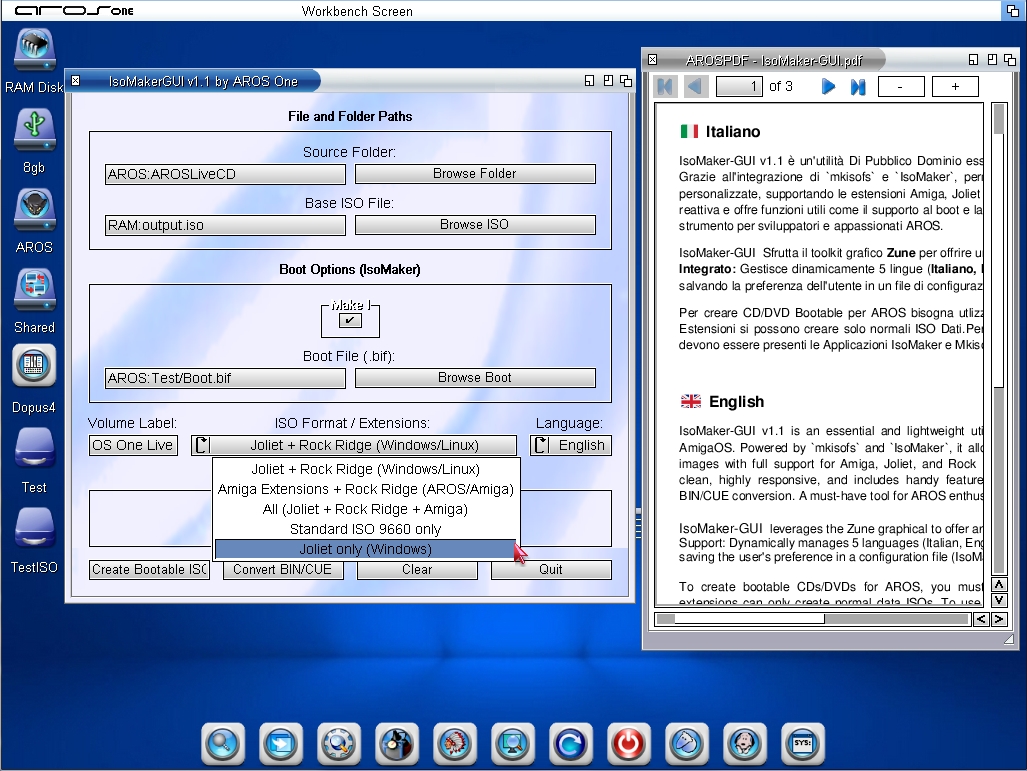
To create a bootable AROS ISO, select Jioliet; other extensions can be used to create data CDs/DVDs.
The DOS applications IsoMaker and mkisofs can be downloaded individually.
You do not have access to view attachments
AMIGASYSTEM
Thank you. It looks very useful.
Does your archive include usage instructions to explain what each of the buttons and options are doing?
I downloaded the archive. I'll try it out sometime this weekend I hope.
Edited by miker1264 on 10-09-2026 15:11,
2 days agoAMIGASYSTEMDistro Maintainer Posted
2 days agoSimple and intuitive: in the first pane, you’ll find the “Source Folder” field, which is used to create the ISO—set the path to the folder containing the CD/DVD data. The “Base ISO Folder” is the path where the ISO will be saved.
Before proceeding with creation, in the third pane, “ISO Format/Extension,” choose the volume name and the ISO type.
Once the ISO is created, in the second pane (which becomes active after you’ve created the ISO), you can make the “Already Created” ISO bootable; you can also do this on a previously created ISO.
If Rock Ridge is present, you cannot create a bootable ISO; this appears to be an issue with the AROS CDFS.
In practice, Rock Ridge bootable ISOs boot the AROS CD/DVD, but then a “Mount Failure: Error on nameFromLock” error appears, and Wanderer starts without a theme or background.
If you use Joilet, the bootable ISO will work fine, and you’ll be able to install AROS.
The .bif bootloader can be extracted from an AROS build. Later today or tomorrow, I’ll release IsoTool-GUI, which allows you to extract the .bif file from AROS CDs/DVDs (the .bif file must be exported and used with the data from the corresponding build).
For example, you cannot use the .bif file from the standard build with the data from Build D5!!!
AMIGASYSTEMDistro Maintainer Posted
7 hours agoHas anyone here tried them? Do they work well?
AMIGASYSTEMDistro Maintainer Posted
7 hours agoI'll try to compile it for AROS 68k as well, if requested!