
- Home
- Discussion Forum
- AROS FORUMS
- General Chat
- Customizing AROS
Customizing AROS
Last updated on 2 months ago
miker1264Software Dev
Posted 2 months agoThere's no reason the PDF User Guide & the online guide shouldn't complement each other. At the end of the PDF User Guide will a section for links for further information.
It would be great if you could write up something about the networking that you mentioned. I'll PM you with what I have so far.
The Icon Replacement Tool will read from an IconsList.txt file to replace icons. The user will make a list of all the directories and the icon names. Such as "SYS: Utilities/MultiView" you don't need .info at the end. If you list all the directories all the icons will be exchanged. I think I'll add a button to generate the IconsList then the user can edit the file as needed.
If you only want to replace the Lavnder-Blue Drawer Icons with Light Blue Drawer Icons then just list the Drawer Icons in the IconsList. It will be a MUI/Zune application. Hopefully I can add a progressbar.
It would be great if you could write up something about the networking that you mentioned. I'll PM you with what I have so far.
The Icon Replacement Tool will read from an IconsList.txt file to replace icons. The user will make a list of all the directories and the icon names. Such as "SYS: Utilities/MultiView" you don't need .info at the end. If you list all the directories all the icons will be exchanged. I think I'll add a button to generate the IconsList then the user can edit the file as needed.
If you only want to replace the Lavnder-Blue Drawer Icons with Light Blue Drawer Icons then just list the Drawer Icons in the IconsList. It will be a MUI/Zune application. Hopefully I can add a progressbar.
Edited by miker1264 on 01-09-2026 17:14, 2 months ago
ntromansVeteran Member
Posted 2 months ago@miker1264 - The journey begins...
This is the title page of the user guide. I had to come up with a nice logo. After a brief introduction I'd like to explain the layout of Amiga-like OS'es such as AROS, OS4, MorphOS.
But there is more information to add. This is intended mostly for new users along with the a welcome text.
If anyone would like to assist with the user guide PM me. I need some information for SMB setup, Wfi Manager, wireless settings, Pendrive prep. etc. I also need screenshots.
The user guide is one aspect. I'm also making an icon replacement tool and an improved (hopefully) version of the Theme Manager.
Looks great; will we be able to use the sections online too? I'll be happy to contribute chapters on Trident and network/wifi (I'll covering thiese aspects in my next Amiga Addict article anyway).
A way to easily change icons across the system would be brilliant
 .
.Cheers,
Nigel.
miker1264Software Dev
Posted 2 months agoThe journey begins...
This is the title page of the user guide. I had to come up with a nice logo. After a brief introduction I'd like to explain the layout of Amiga-like OS'es such as AROS, OS4, MorphOS.
But there is more information to add. This is intended mostly for new users along with the a welcome text.
If anyone would like to assist with the user guide PM me. I need some information for SMB setup, Wfi Manager, wireless settings, Pendrive prep. etc. I also need screenshots.
The user guide is one aspect. I'm also making an icon replacement tool and an improved (hopefully) version of the Theme Manager.
This is the title page of the user guide. I had to come up with a nice logo. After a brief introduction I'd like to explain the layout of Amiga-like OS'es such as AROS, OS4, MorphOS.
But there is more information to add. This is intended mostly for new users along with the a welcome text.
If anyone would like to assist with the user guide PM me. I need some information for SMB setup, Wfi Manager, wireless settings, Pendrive prep. etc. I also need screenshots.
The user guide is one aspect. I'm also making an icon replacement tool and an improved (hopefully) version of the Theme Manager.
Edited by miker1264 on 01-09-2026 15:41, 2 months ago
2 users reacted to this post
OlafSch, sonountaleban
miker1264 attached the following image:

x-visionJunior Member
Posted 2 months ago@AMIGASYSTEM - What I don’t understand is why it has to look like AMiGA. AROS has its own well-defined identity; it shouldn’t copy but be innovative. Let’s leave the past behind—it’s been more than 30 years now, and nobody knows AMiGA anymore. Otherwise, we’ll just end up making new users feel nostalgic.
The same goes for Ambient or Dopus5, why copy when we could create something new, innovative, and appealing to attract new users?
+1000
miker1264Software Dev
Posted 2 months ago@OlafSch - @miker
also Kens icon set is relativ complete. It is always the problem to find icons for all included software, otherwise it looks not good either
I really like Ken's Icons. They're very stylish and give a professional look.
I've already made several dozen new icons that have been posted on AROS Archives. I'm in the process of making complete sets of colored drawer icons in various colors.
I'd like to complete the set of Charcoal Drawer Black Icons for the Dark Scheme. The other icon sets are for the Light Themes.
Edited by miker1264 on 01-09-2026 14:05, 2 months ago
OlafSchSenior Member
Posted 2 months ago@miker
also Kens icon set is relativ complete. It is always the problem to find icons for all included software, otherwise it looks not good either
also Kens icon set is relativ complete. It is always the problem to find icons for all included software, otherwise it looks not good either
miker1264Software Dev
Posted 2 months agoThe screenshots with the Gorilla Icons and bright yellow background that is difficult to read is how basic AROS looks just after compiling it.
There are different distros (distributions) that are maintained by some very dedicated, hard working AROS users!
Icaros Desktop was a distro that was maintained by Paolone but it hasn't been active for a few years. It's also only 32bit not newer 64bit.
As for Ken's v4 icons I was in contact with Ken a year or two ago and he gave permission to use his icons, modify them & distribute them since the designs are quite old now.
I use Ken's Icons almost exclusively because they look really nice & clean. It really gives AROS a more modern look with some nice icons!
There are different distros (distributions) that are maintained by some very dedicated, hard working AROS users!
Icaros Desktop was a distro that was maintained by Paolone but it hasn't been active for a few years. It's also only 32bit not newer 64bit.
As for Ken's v4 icons I was in contact with Ken a year or two ago and he gave permission to use his icons, modify them & distribute them since the designs are quite old now.
I use Ken's Icons almost exclusively because they look really nice & clean. It really gives AROS a more modern look with some nice icons!
1 user reacted to this post
OlafSch
arosbeginnerMember
Posted 2 months agoHi all,
I'm studying the various Aros distros and have also installed Icaros Desktop, and I think the system is quite well-made, perhaps even too complete.
Icaros desktop
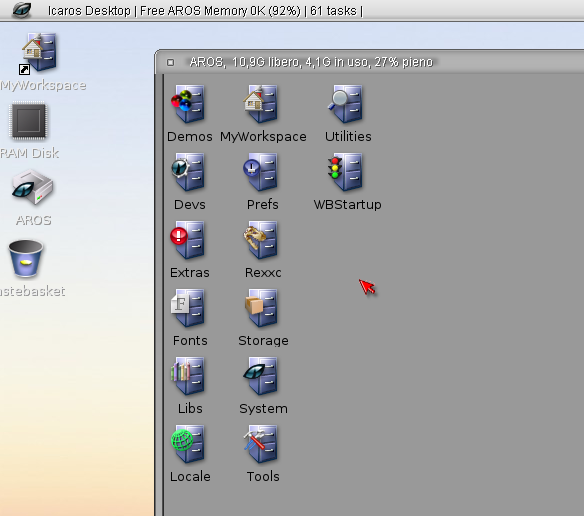
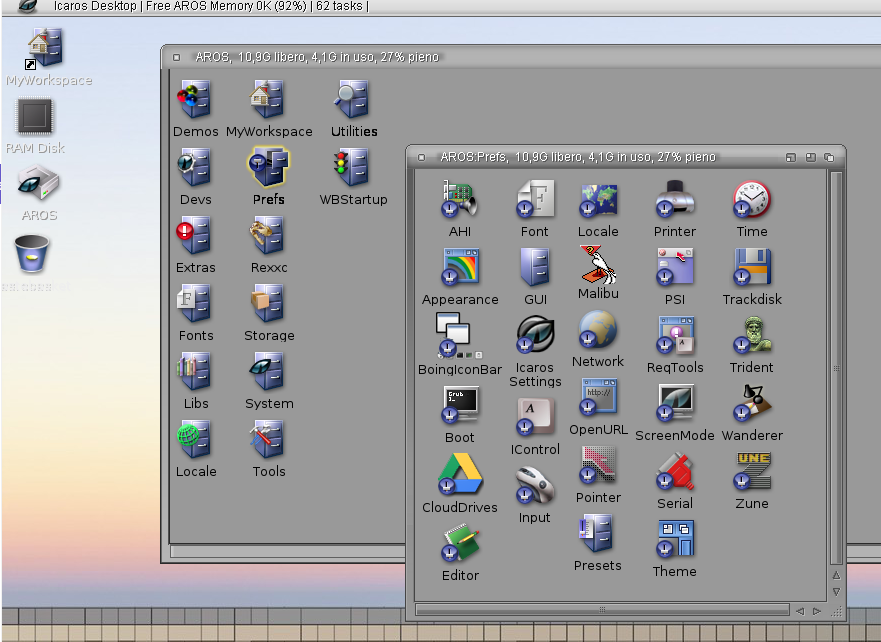
I think the icons are Kenicons: https://www.amiga-look.org/artwork/kens-icons-v23
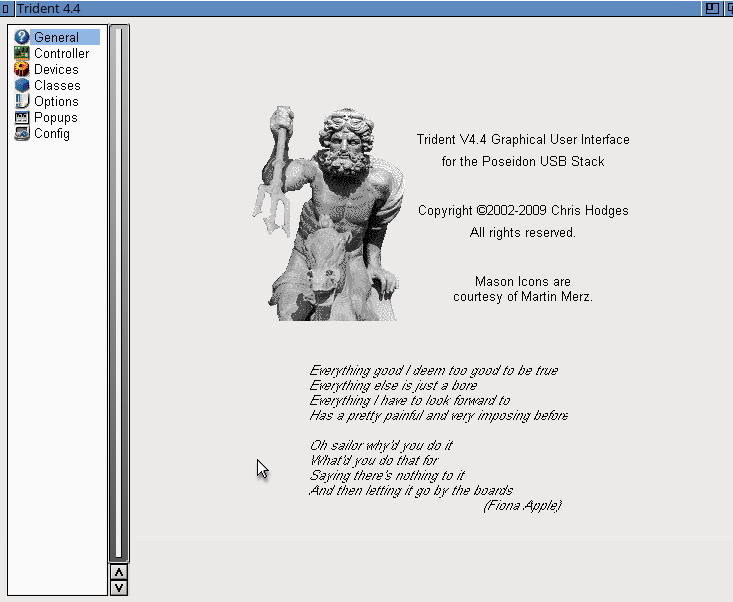
On Aros, there are preferences that use Masonicons and other preferences with different icons.
USB Trident
Bluetooth
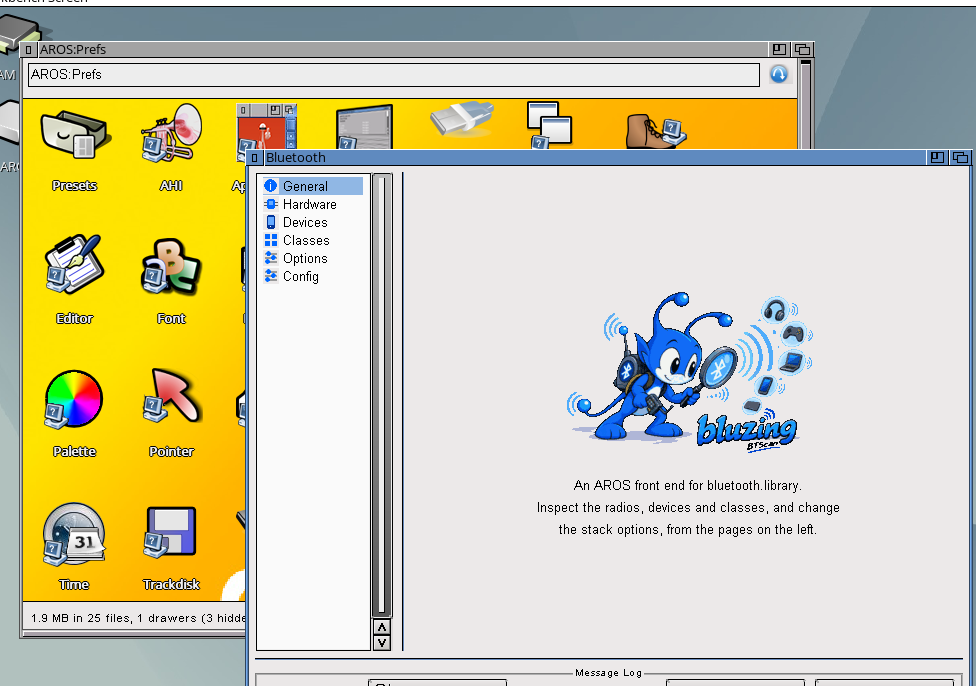
There are also preferences with the same icon USB and Bluetooth
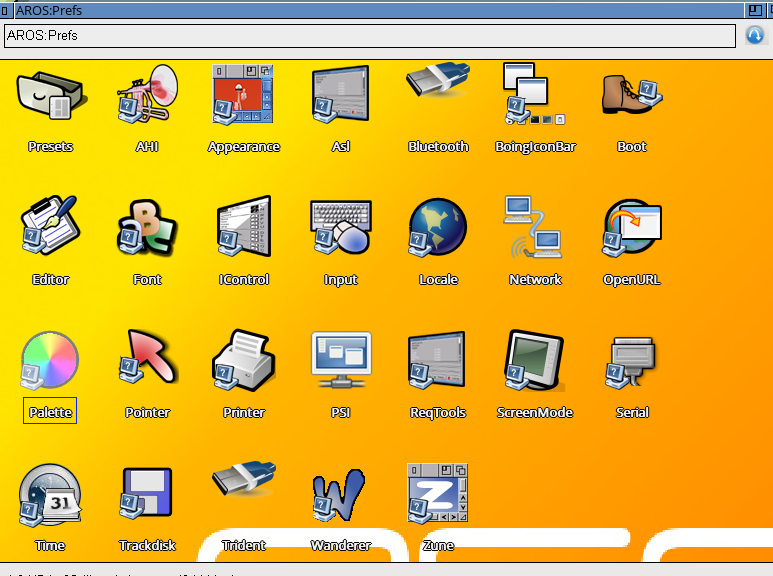
I think everything could be standardized with Mason, Kens or glow if possibile and license permission, and that's it. A little effort for a uniform result.
What you think?
I'm studying the various Aros distros and have also installed Icaros Desktop, and I think the system is quite well-made, perhaps even too complete.
Icaros desktop
I think the icons are Kenicons: https://www.amiga-look.org/artwork/kens-icons-v23
On Aros, there are preferences that use Masonicons and other preferences with different icons.
USB Trident
Bluetooth
There are also preferences with the same icon USB and Bluetooth
I think everything could be standardized with Mason, Kens or glow if possibile and license permission, and that's it. A little effort for a uniform result.
What you think?
Edited by arosbeginner on 01-09-2026 11:14, 2 months ago
miker1264Software Dev
Posted 2 months agoAlthough we have an online user guide it's very basic and it doesn't provide much for new AROS users.
So I have started to put together a PDF User Manual that will provide information for all flavors of AROS.
It's purpose is to guide new users in understanding how Amiga-like OS'es are organized and basic concepts. I'll post it on AROS Archives when it is completed in the next two weeks.
As far as Customizing AROS it can be copied to the Docs Drawer and it can be associated with the Welcome text file on the Desktop that greets new users. The text file is the start point with a brief introduction & links to manuals and useful information.
If you already have a PDF User Guide for your distro then please disregard.
So I have started to put together a PDF User Manual that will provide information for all flavors of AROS.
It's purpose is to guide new users in understanding how Amiga-like OS'es are organized and basic concepts. I'll post it on AROS Archives when it is completed in the next two weeks.
As far as Customizing AROS it can be copied to the Docs Drawer and it can be associated with the Welcome text file on the Desktop that greets new users. The text file is the start point with a brief introduction & links to manuals and useful information.
If you already have a PDF User Guide for your distro then please disregard.
Edited by miker1264 on 01-09-2026 11:16, 2 months ago
OlafSchSenior Member
Posted 2 months agonot long ago I was a little disappointed when people said aros is not amigaos, today I say "yes it is not". AmigaOS is now really oldfashioned. So AROS has a opportunity to break outside the typical retro bubble as a nice alternative OS. But for that starting must become as easy as possible. AROS has inherited much of Amiga and that is very different to other modern platforms. New users in many cases have no amiga background so we must see how we optimize both system and documentation that people can easily start and later get deeper inside and not be disappointed and leaave.
As a small example I tried to integrate as many unix commands (from aminet) in aros vision as possible and optimized it there. That would be the best idea, to make it useable like people know it already. And of course lots of documentation showing differences and similarities between the different platforms. A lot of work when done good, I know.
As a small example I tried to integrate as many unix commands (from aminet) in aros vision as possible and optimized it there. That would be the best idea, to make it useable like people know it already. And of course lots of documentation showing differences and similarities between the different platforms. A lot of work when done good, I know.
Edited by OlafSch on 31-08-2026 06:08, 2 months ago
3 users reacted to this post
Argo, Deremon, miker1264
arosbeginnerMember
Posted 2 months agoAros is the continuation of AmigaOS 3, with compatibility but with an eye to the future.
Aros, with new porting, must attract new users, and they must stay—not just be satisfied, but see the prospect of using the system for various activities.
Aros could be the alternative operating system, faster and lighter, with some "specific" features that will appeal to users.
Aros, with new porting, must attract new users, and they must stay—not just be satisfied, but see the prospect of using the system for various activities.
Aros could be the alternative operating system, faster and lighter, with some "specific" features that will appeal to users.
terminillsMember
Posted 2 months ago@coffeecat -@terminills
As long as we're talking about looks and not functionality, infrastructure and proper integration it will always be the wrong question IMHO.
Agreed, and that's why my actual proposal is infrastructure: a theme engine that works the same everywhere, and a documented design system apps can build against. The default look is the least important part of the post.
But if I get the point, I wonder if there's a bigger clash - when talking about functions and infrastructure, the question might be: what is AROS for, as a platform? Is it just AmigaOS3 on x86?
AmigaOS 3.1 API is baseline... It is not the goal. I personally run ABIv1 SMP on a Ryzen 3950 with 128GB of ram. I've been testing things like native clang, Chromium , Node , Electron. Kalamatee has added Multi User Support, Bluetooth, HDMI Audio, enhanced SMP support, ported to misc arches.
 cdimauroMember
AROS is at least a reimplementation of the Amiga o.s. 3.1.
miker1264Software Dev
Posted 2 months ago@coffeecat
That last part is a good question & it's probably something that we have all thought about. Is AROS just Amiga OS3.1 on x86? Or is it more?
I think that exciting times are coming! With the Raspberry Pi port of AROS there's an opportunity to show that AROS can be it's own flavor of OS, breaking it's ties with the past & embracing the future!
I'm so confident that AROS Pi or whichever distro arises for AROS on Raspberry Pi it will be so successful & popular that I ordered my own Raspberry Pi 400. It should arrive next week sometime.
I think that mostly I want to see how fast AROS is on Raspberry Pi. The native versions of AROS on real hardware seem so much faster than the hosted versions or emulated variety as in VirtualBox or VMWare.
Especially with the new support for Bluetooth & USB3 & newer drivers, these are exciting times for AROS.
That last part is a good question & it's probably something that we have all thought about. Is AROS just Amiga OS3.1 on x86? Or is it more?
I think that exciting times are coming! With the Raspberry Pi port of AROS there's an opportunity to show that AROS can be it's own flavor of OS, breaking it's ties with the past & embracing the future!
I'm so confident that AROS Pi or whichever distro arises for AROS on Raspberry Pi it will be so successful & popular that I ordered my own Raspberry Pi 400. It should arrive next week sometime.
I think that mostly I want to see how fast AROS is on Raspberry Pi. The native versions of AROS on real hardware seem so much faster than the hosted versions or emulated variety as in VirtualBox or VMWare.
Especially with the new support for Bluetooth & USB3 & newer drivers, these are exciting times for AROS.
Edited by miker1264 on 30-08-2026 15:58, 2 months ago
1 user reacted to this post
sonountaleban
coffeecatMember
Posted 2 months ago@terminills
As long as we're talking about looks and not functionality, infrastructure and proper integration it will always be the wrong question IMHO.
Agreed, and that's why my actual proposal is infrastructure: a theme engine that works the same everywhere, and a documented design system apps can build against. The default look is the least important part of the post.
But if I get the point, I wonder if there's a bigger clash - when talking about functions and infrastructure, the question might be: what is AROS for, as a platform? Is it just AmigaOS3 on x86?
Edited by coffeecat on 30-08-2026 14:25, 2 months ago
1 user reacted to this post
sonountaleban
terminillsMember
Posted 2 months ago@coffeecat - I think this thread is arguing about the wrong axis. The question isn't retro vs. modern. The question is honest vs imitative.
Look at games from the late 90s: pre-rendered backgrounds aged badly because they chased unattainable photorealism, while pixel art remains timeless by respecting constraints. The same applies to Amiga-land themes: many modern themes are just hobbyist copies of XP, Aqua, or early Gnome. Mainstream copies age poorly as the original evolves and the copy remains static. The plain 3.x look aged better for the same reason pixel art did: it doesn't pretend to be anything.
And this matters precisely because I want AROS to be a real alternative OS, not a museum piece. Nobody switches to a system that looks like a worse version of the thing they already have. Haiku understood this: it is not winning on numbers, but nobody confuses it with anything else, and that is why people take it seriously.
So my proposal for the upstream default:
A clean, flat-ish/skeumorphic (skeumorphism is back) remake of 3.x. Same/similar proportions and gadget language, no bevels, no or very subtle gradients, drop shadows only where it makes sense. One readable font with proper contrast on light and dark backgrounds. Low-poly done with pride, not a pre-render. In fact, it would be amazing to have a design system - a documented set of choices, paddings, font styles. Consider Apple HIG or even Material.
Everything else lives in themes, and switching must be one click, stable, and cover the whole package: window style, icons, backgrounds, sounds. Distributions ship whatever they like on top. That ends this debate for good, because nobody has to win it.
Then sell AROS on what an alternative is judged by, not on icons. Fast, small, comprehensible: a whole OS that boots in seconds, fits in one person's head, and can be changed by that person. Put that in the videos, and show the theme switch for ten seconds, as deadwood suggested.
Omarchy is the current proof this works: one opinionated default, whole-system theme switch on one keystroke, and a loud, explicit ambition to win the desktop. Nobody there is voting on window borders. AROS cannot borrow the Linux foundations, but it can borrow the attitude: decide, ship the decision as the default, make everything else a theme, and say where you are going. I came back to Amiga because I think this platform still has somewhere to go, not because I want to stay in 1992.
As long as we're talking about looks and not functionality, infrastructure and proper integration it will always be the wrong question IMHO.
Edited by terminills on 30-08-2026 13:52, 2 months ago
2 users reacted to this post
Argo, coffeecat
coffeecatMember
Posted 2 months agoI think this thread is arguing about the wrong axis. The question isn't retro vs. modern. The question is honest vs imitative.
Look at games from the late 90s: pre-rendered backgrounds aged badly because they chased unattainable photorealism, while pixel art remains timeless by respecting constraints. The same applies to Amiga-land themes: many modern themes are just hobbyist copies of XP, Aqua, or early Gnome. Mainstream copies age poorly as the original evolves and the copy remains static. The plain 3.x look aged better for the same reason pixel art did: it doesn't pretend to be anything.
And this matters precisely because I want AROS to be a real alternative OS, not a museum piece. Nobody switches to a system that looks like a worse version of the thing they already have. Haiku understood this: it is not winning on numbers, but nobody confuses it with anything else, and that is why people take it seriously.
So my proposal for the upstream default:
A clean, flat-ish/skeumorphic (skeumorphism is back) remake of 3.x. Same/similar proportions and gadget language, no bevels, no or very subtle gradients, drop shadows only where it makes sense. One readable font with proper contrast on light and dark backgrounds. Low-poly done with pride, not a pre-render. In fact, it would be amazing to have a design system - a documented set of choices, paddings, font styles. Consider Apple HIG or even Material.
Everything else lives in themes, and switching must be one click, stable, and cover the whole package: window style, icons, backgrounds, sounds. Distributions ship whatever they like on top. That ends this debate for good, because nobody has to win it.
Then sell AROS on what an alternative is judged by, not on icons. Fast, small, comprehensible: a whole OS that boots in seconds, fits in one person's head, and can be changed by that person. Put that in the videos, and show the theme switch for ten seconds, as deadwood suggested.
Omarchy is the current proof this works: one opinionated default, whole-system theme switch on one keystroke, and a loud, explicit ambition to win the desktop. Nobody there is voting on window borders. AROS cannot borrow the Linux foundations, but it can borrow the attitude: decide, ship the decision as the default, make everything else a theme, and say where you are going. I came back to Amiga because I think this platform still has somewhere to go, not because I want to stay in 1992.
Look at games from the late 90s: pre-rendered backgrounds aged badly because they chased unattainable photorealism, while pixel art remains timeless by respecting constraints. The same applies to Amiga-land themes: many modern themes are just hobbyist copies of XP, Aqua, or early Gnome. Mainstream copies age poorly as the original evolves and the copy remains static. The plain 3.x look aged better for the same reason pixel art did: it doesn't pretend to be anything.
And this matters precisely because I want AROS to be a real alternative OS, not a museum piece. Nobody switches to a system that looks like a worse version of the thing they already have. Haiku understood this: it is not winning on numbers, but nobody confuses it with anything else, and that is why people take it seriously.
So my proposal for the upstream default:
A clean, flat-ish/skeumorphic (skeumorphism is back) remake of 3.x. Same/similar proportions and gadget language, no bevels, no or very subtle gradients, drop shadows only where it makes sense. One readable font with proper contrast on light and dark backgrounds. Low-poly done with pride, not a pre-render. In fact, it would be amazing to have a design system - a documented set of choices, paddings, font styles. Consider Apple HIG or even Material.
Everything else lives in themes, and switching must be one click, stable, and cover the whole package: window style, icons, backgrounds, sounds. Distributions ship whatever they like on top. That ends this debate for good, because nobody has to win it.
Then sell AROS on what an alternative is judged by, not on icons. Fast, small, comprehensible: a whole OS that boots in seconds, fits in one person's head, and can be changed by that person. Put that in the videos, and show the theme switch for ten seconds, as deadwood suggested.
Omarchy is the current proof this works: one opinionated default, whole-system theme switch on one keystroke, and a loud, explicit ambition to win the desktop. Nobody there is voting on window borders. AROS cannot borrow the Linux foundations, but it can borrow the attitude: decide, ship the decision as the default, make everything else a theme, and say where you are going. I came back to Amiga because I think this platform still has somewhere to go, not because I want to stay in 1992.
Edited by coffeecat on 30-08-2026 12:59, 2 months ago
4 users reacted to this post
aha, sonountaleban, Argo, r-tea
OlafSchSenior Member
Posted 2 months ago@miker
Problem is you need a kind of manual for every distribution basically
As a example aros vision fetches time from a time server and the time finally depends on preferences in local
but that can be in other distributions like Aros One different
Much is similar of course at the basic like settings fonts or keyboard
also propably much is different from other platforms, people will not understand at first. Of course you can ask AI like that of google about it, but it needs a lot of learning at first. Aros is different.
In Aros Vision Magellan I also offer the option to change background, theme and icons by selecting menu. Basically it is done by copying pref files and/or other files or even deleting a file
Problem is you need a kind of manual for every distribution basically
As a example aros vision fetches time from a time server and the time finally depends on preferences in local
but that can be in other distributions like Aros One different
Much is similar of course at the basic like settings fonts or keyboard
also propably much is different from other platforms, people will not understand at first. Of course you can ask AI like that of google about it, but it needs a lot of learning at first. Aros is different.
In Aros Vision Magellan I also offer the option to change background, theme and icons by selecting menu. Basically it is done by copying pref files and/or other files or even deleting a file
Edited by OlafSch on 30-08-2026 09:48, 2 months ago
1 user reacted to this post
miker1264
miker1264Software Dev
Posted 2 months agoI'm glad we are having a discussion about visual aesthetics. Customizing AROS is an important aspect of the OS Experience in my opinion. It's a good feeling to be able to assemble a nice looking Theme we can enjoy!
When I say Theme I mean the whole thing! The theme included the set of images used for desktop background, window background, startup sound, window style & icon set being used. We have a Theme Manager that Paolo setup in Lua. But it doesn't work always because it requires AmiLua. It's all lacking as a Theme Manager where we can choose Backgrounds, Sounds, Icons & Window Styles. It does ok with the last one & it's a good start but it needs to re-written in 'c' code as a System Component.
For my part I'm working on a project called "Theme Builder" but at first it's more of window theme replicator for themes with solid fill colors. It replaces the primary color in the theme elements which can be tedious. It saves the "default" png images as theme elements to build a new colored theme rather than doing it by hand. It uses PNG datatype to open each element. After traversing the pixel array to replace colors it uses PNG datatype to save the new theme element. This is for mass producing themes. I am doing the same for mass production of colored icons from base images.
On AROS One I saw a video where it's possible to change desktop background & window theme style with just a button icon. That's cool. We need an easy Theme Manager to install these customizations quickly.
It might be a good idea to have an "Extras" Package like some OS'es did in the early '90's onwards. It can be an ISO of backgrounds, icons, etc.
Documentation is great. We don't have paper manuals like in the early days. Now we have Amiga Guides & PDF Manuals. That's perfectly fine. AROS users will need a thorough online user guide with links to How To Articles written by users. I need these guides too because I know nothing about setting up SMB, wifi, or even AHI sound. If we could have PDF Manuals in a Docs Drawer or PDF's Distro maintainers can download to copy to such a location that would be great for users who are to lazy to go online & would rather spend countless hours reading wordy, nerdy manuals.
I like the idea of the Welcome! Text File with a nice icon on the Desktop. It's a brief introduction with links to online information about AROS.
When I say Theme I mean the whole thing! The theme included the set of images used for desktop background, window background, startup sound, window style & icon set being used. We have a Theme Manager that Paolo setup in Lua. But it doesn't work always because it requires AmiLua. It's all lacking as a Theme Manager where we can choose Backgrounds, Sounds, Icons & Window Styles. It does ok with the last one & it's a good start but it needs to re-written in 'c' code as a System Component.
For my part I'm working on a project called "Theme Builder" but at first it's more of window theme replicator for themes with solid fill colors. It replaces the primary color in the theme elements which can be tedious. It saves the "default" png images as theme elements to build a new colored theme rather than doing it by hand. It uses PNG datatype to open each element. After traversing the pixel array to replace colors it uses PNG datatype to save the new theme element. This is for mass producing themes. I am doing the same for mass production of colored icons from base images.
On AROS One I saw a video where it's possible to change desktop background & window theme style with just a button icon. That's cool. We need an easy Theme Manager to install these customizations quickly.
It might be a good idea to have an "Extras" Package like some OS'es did in the early '90's onwards. It can be an ISO of backgrounds, icons, etc.
Documentation is great. We don't have paper manuals like in the early days. Now we have Amiga Guides & PDF Manuals. That's perfectly fine. AROS users will need a thorough online user guide with links to How To Articles written by users. I need these guides too because I know nothing about setting up SMB, wifi, or even AHI sound. If we could have PDF Manuals in a Docs Drawer or PDF's Distro maintainers can download to copy to such a location that would be great for users who are to lazy to go online & would rather spend countless hours reading wordy, nerdy manuals.
I like the idea of the Welcome! Text File with a nice icon on the Desktop. It's a brief introduction with links to online information about AROS.
Edited by miker1264 on 30-08-2026 09:22, 2 months ago
1 user reacted to this post
sonountaleban
ntromansVeteran Member
Posted 2 months agoUnfortuantely a lot of people do go with first impressions. Psychologists tell us on first meeting a person you appraise then by their appearance in just 10 s, and I suspect it's the same for many with an OS.
As I mentioned in another thread, my students (and indeed my daughters) have commented that my setup looks dated to them; I like the 3D look, they are used to the flat style of modern Windows and smartphones. So I feel we do need a range of themes to cater to a range of tastes and I agree that when AROS is showcased a range of styles coud be shown (I need to consider this for any future shows). An easy to use editor to customise themes furter would be also be ideal.
Cheers,
Nigel.
As I mentioned in another thread, my students (and indeed my daughters) have commented that my setup looks dated to them; I like the 3D look, they are used to the flat style of modern Windows and smartphones. So I feel we do need a range of themes to cater to a range of tastes and I agree that when AROS is showcased a range of styles coud be shown (I need to consider this for any future shows). An easy to use editor to customise themes furter would be also be ideal.
Cheers,
Nigel.
4 users reacted to this post
aha, miker1264, sonountaleban, r-tea
You can view all discussion threads in this forum.
You cannot start a new discussion thread in this forum.
You cannot reply in this discussion thread.
You cannot start on a poll in this forum.
You cannot upload attachments in this forum.
You can download attachments in this forum.
You cannot start a new discussion thread in this forum.
You cannot reply in this discussion thread.
You cannot start on a poll in this forum.
You cannot upload attachments in this forum.
You can download attachments in this forum.
Moderator: Administrator, Moderators
Users who participated in discussion: terminills, deadwood, AMIGASYSTEM, ntromans, retrofaza, cdimauro, miker1264, OlafSch, arosbeginner, r-tea, x-vision, coffeecat