The only issue with AROS programming is that it takes soooo long to develop source code that does anything useful. It's very time consuming and people just aren't willing to commit themselves to it.
It may take several months or even years to develop useful source code. One advantage would be to produce source code that can be re-used for other programs or system files. That's where I am now with my projects. Much of the code can be re-used to be included in new apps.
Although my programming skills are improving there are some things I still need to learn. My annotation in my source code has improved. Now I add notations and cleanup code and fix indentation as I go. I used to wait till the end, but that never gets done! It's too much to do at the end.
There are several things I need to learn to get better at programming. I have to get much better at using GitHub. I need to gain experience writing device drivers whether for sound or graphics or peripherals such as USB or Serial connections. I also need experience writing or updating system libraries. Picture Datatypes, in a sense, are simplified libraries so I have a good start there.
Hint: there is a UART driver for AOS4 that I'm looking at. I'd like to implement something like "Waffle Reader" for AROS using USB-Serial with Poseidon USB implementation.
 cdimauroJunior Member
Posted
1 month agoVibe / AI can help a lot improving the productivity, but I recommend it only to experienced people.
The most important thing for a developer is to exercise, practice, and develop a good mindset and knowledge-base.
After that, a bot can multiply the productivity.
Edited by cdimauro on 06-04-2026 13:28,
1 month agoI have used Copilot AI recently, mostly for research to help understand certain concepts. It also provides useful code examples that actually work when included in my application and when compiled. I used it for gaussian blur research.
It does speed up the development process because I don't need to search the AROS programming database or OS4 documentation for programming. I just ask specific questions to get specific answers.
I hadn't heard of Vibe Coding before. I'll look into that. Anything that speeds up the coding process whether it is assistance with research concepts or actual code examples is a bonus! It's beneficial.
Edited by miker1264 on 06-04-2026 15:11,
1 month agoIt's not an icon tool exactly per the title of this thread, but in the past I started a test project that I haven't finished.
I modified Icon Library to use "Icon Alias" which substitutes the images of the currently displayed icons based on an alternate set of icons.
Like I mentioned I modified Icon Library to use alternate icons. I proved that it is possible because I was able to substitute the images based on an "Icons list" text file.
Like when we use alternate Window Themes there's a text file that indicates which theme to use. There will be a text file indicating to Icon Library which alternate icons to use.
If the icon alias text file is present then icon alias is active. Icon Library will substitute icon images of the current icons if the icon names match the names on the icons list.
For example, if the current icon is "System" and icon alias is active then Icon Library will read the icons list in the specified in the text file. If it finds "System" in the list it will substitute the icon images for the images in the alternate icon. If the icon name is not on the list, Icon Library displays the current icon as usual then goes to the next icon, etc. When the prefs text file is not present then icons display as usual.
It's an easy way to display "Icon Themes" to accompany "Window Themes" without physically changing your entire icon set. If we don't already have 'icon prefs' it might be useful as well for settings.
I believe Icon Alias deserves another look to see If I can make it work! Actually , I should rephrase that. It WORKS but now I need to clean it up and streamline & formalize it. :-)
Edited by miker1264 on 10-04-2026 16:54,
31 days agoAs for the Icon Splitter for AROS I made a few internal changes, updated the version number and I added a new Datatypes function to split an OS4 ARGB Icon to save it as PNG images. Previously I was saving directly to TARGA format because that was easier for Amiga 68k. At that time I was having an issues trying to figure out proper usage of Datatypes for Amiga.
The AROS version has been corrected. In order to fix the Amiga version I setup a small application called DTObject (Datatype Object) to test Datatypes on Amiga 68k. It's working as expected. More testing required though. :-)
For Icon Splitter for Amiga 68k I'm using a newer version of Peter K's Icon Library. I use ICON CONTROL to get the pixel data from the OS4 icon's ARGB chunks. Then save to TARGA file but it should be PNG.
Edited by miker1264 on 04-05-2026 13:33,
7 days agoThe main difference between the AROS version of Icon Splitter and the Amiga version is that Amiga 68k requires that all the necessary libraries be opened at the start of the program and then closed at the end. AROS opens libraries as needed.
The last few days have been frustrating, challenging and rewarding all at the same time!
I'm trying to update my Icon Splitter for Amiga OS 3.x but I have had several issues on the Amiga side.
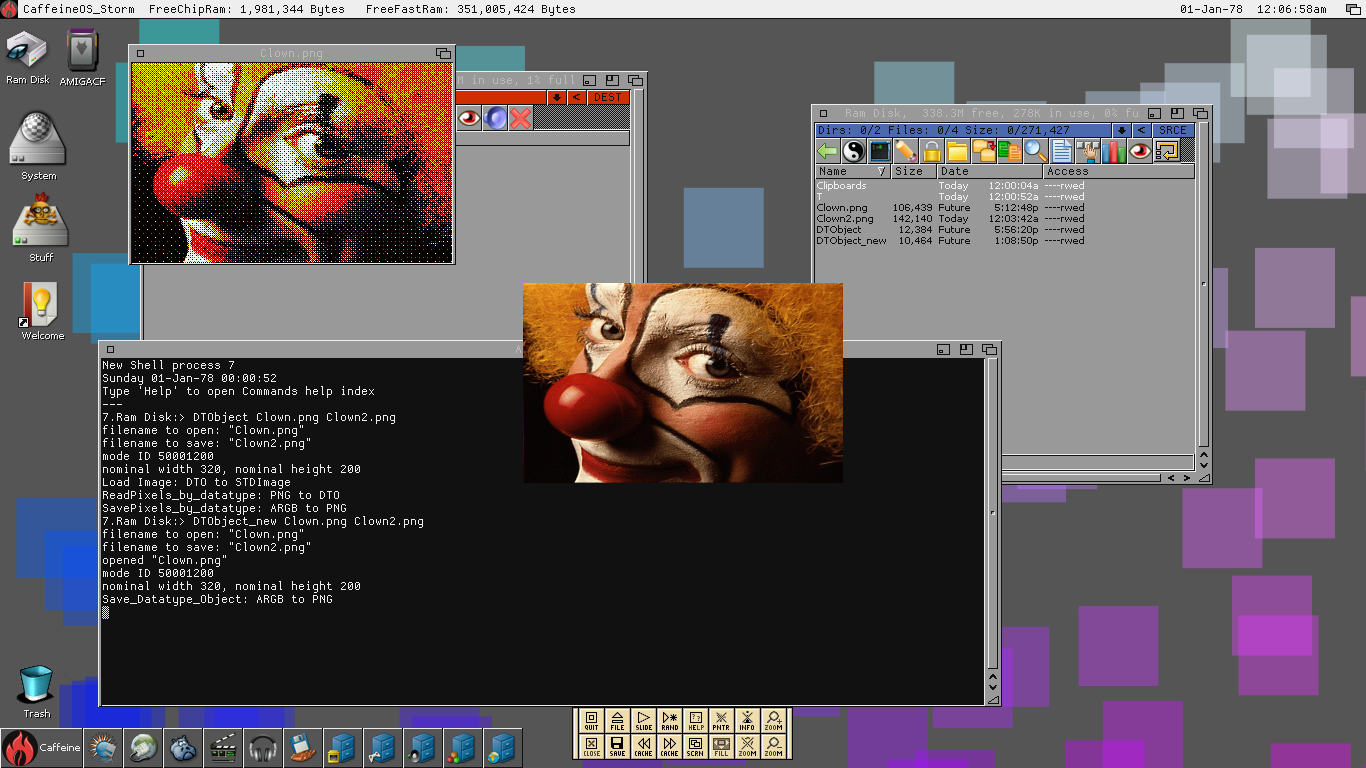
In addition to trying to get the picture Datatypes to work correctly I was also trying to find an accurate method to draw RGB & ARGB images to the RTG rasterport of Caffeine OS which is Amiga OS 3.9 but it didn't go well at first. Adding a datatype to the window used dithering which caused the image to look terrible. Maybe the original AGA chipset and libraries only supported up to 8bit bitmaps? I'm not sure.
Then I did more research and I realized I had two main options -Cybergraphx or Picasso96. As far as the first option I'm used to using WritePixelArray & WritePixelArray alpha on AROS with Cybergraphx. But Caffeine OS uses Picasso96 & the two RTG solutions don't play well together on the same system.
Then doing more research I discovered I can use p96WritePixelArray for drawing purposes & that since early versions Picasso96 offered a framework to intercept Cybergraphx function calls to use its own functions instead. So it's Cybergraphx code on Picasso96. I was just about to test that when the 2GB CF Card I was using to transfer Program data, test images & test icons to and from my A1200 took a dump! I lost most of my data.
However, I'm trying to reconstitute the data on another CF Card for testing. I hesitate to use HD floppy disk to transfer data. It's such a pain! The good news is my Picasso96 code to draw to the RTG screen did finally compile correctly. But does it work? That's the question!!
Edited by miker1264 on 09-05-2026 11:55,
2 days agoI've successfully setup a new 4GB CF card for testing! It at first showed up as CF0:Nondos so I had to do a quick fat95 format then it worked.
But my Picasso96 code didn't work. There are other drawing methods. I'll keep trying till something works. :-)
I will make frequent backups of the test data on my CF Card going forward. I don't want to lose any valuable source code!
Edited by miker1264 on 09-05-2026 14:55,
2 days agoI added more Datatypes functions to the DTObject test program getting ready to update Icon Split for Amiga 68k & AROS 68k. At the moment it saves ARGB image data as TARGA instead of using Datatypes to save as PNG. There will also be some internal updates to bring it up to the current code of Icon Split for AROS 32bit. Then after the updates I'll try to compile the code for AROS 64bit.
Although the Datatypes code for the DTObject test program is working the display method isn't doing well. The image is remapped and dithered which is not the desired effect.
At a later date I'll continue to find a solution for displaying 24bit/32bit images on RTG screens on Amiga. I suspect I'll need to open a custom screen whose depth and dimensions match the image to be displayed. The window dimensions match the screen exactly and it uses the custom RTG screen that was opened already. When it's time to display the image move the screen to the front over the workbench screen then use BltBitMapRastPort to draw it in the rasterport. That should work well.
miker1264 attached the following image: