Oh no! Where's the JavaScript?
Your Web browser does not have JavaScript enabled or does not support JavaScript. Please enable JavaScript on your Web browser to properly view this Web site, or upgrade to a Web browser that does support JavaScript.

Raspberry 3

Last updated on 1 day ago

CoolCat5000CoolCat5000Member
Posted 5 days ago
Hi @terminills ,
Was you working on bluetooth support?

Regards,
amigamiaamigamiaAdmin
Posted 5 days ago

Bohun wrote:

@Bohun - Perhaps the author could be persuaded to make a Linux-hosted version. As I understand it, once launched AROS-bootstrap as a Linux application, the entire 64-bit environment from native distro would work regardless of the RPi version from 3 upwards.


Noooo!!! Please, with this Linux hosted. Defeats the purpose of having a new native operating system. I understand it for development but for standard daily usage, what compels anyone to just stick with Linux?
amigamiaamigamiaAdmin
Posted 4 days ago

CoolCat5000 wrote:

@CoolCat5000 - well, at least it booted (very fast)!
Couldnt test it cause i dont have usb mouse (only bluetooth)


I got it to boot at the same point as you did but with USB Keyboard and mouse, nothing moves on the screen. Perhaps it's the USB stack not all there yet. I am using a RPi 3b+.

Can anyone else confirm USB works or doesn't work?
D
deadwoodAROS Dev
Posted 4 days ago
I also don't have mouse pointer visible (but mouse works, I can click icons) - but I'm running in QEMU. Is far as I understand the missing mouse pointer is QEMU-specific issue and it should not be happening on real hardware.
CoolCat5000CoolCat5000Member
Posted 4 days ago
It has some usb stack (looking from the logs).

Dunno how functional it is, i dont have usb mouse (i do have usb keyboard, if there are some shortcut that moves the mouse i could try)

Regards,
CoolCat5000CoolCat5000Member
Posted 4 days ago
To not step into other people feets i started another project (wip)

https://github.co...m68k-emu68

So far, so good!

πŸ™‚
B
BohunJunior Member
Posted 4 days ago
RPi 3B+ purchased. I don't know where else I'll fit it in my "Amiga server room," but I can't resist the pleasure of testing the native ARM version of AROS.
deadwood, retrofaza, CoolCat5000
CoolCat5000CoolCat5000Member
Posted 4 days ago
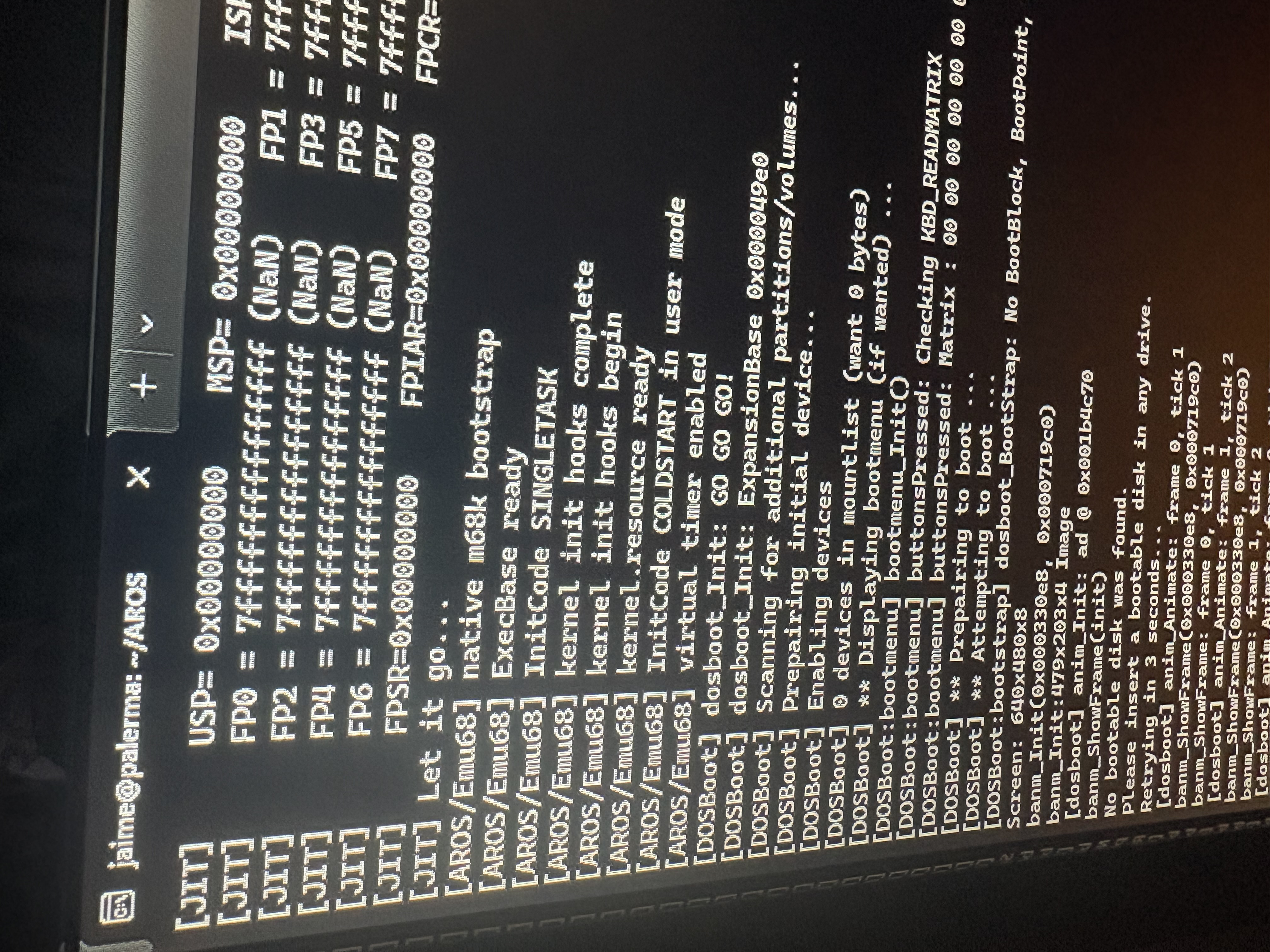
Dunno how interesting this could be (i think it’s the first aros 68k build that doesnt rely on the chipsets), but almost gotcha aros 68k running under emu68.

Still no gfx, but it seems cool to me (searching for boot media). πŸ™‚
CoolCat5000 attached the following image:
img_1023.jpeg
ami-elvisami-elvisJunior Member
Posted 3 days ago

Bohun wrote:

@Bohun - RPi 3B+ purchased. I don't know where else I'll fit it in my "Amiga server room," but I can't resist the pleasure of testing the native ARM version of AROS.

Would love to get a report about your experience later. I'm stuck building AROS PC's but Pi's need no space so I could have some of those as well Smile
amigamiaamigamiaAdmin
Posted 2 days ago
I can't get any USB KB/Mouse to work on my RPi 3B+. Have tried a few different ones but nothing works. Let me know if you guys manage
D
deadwoodAROS Dev
Posted 2 days ago
Please check the latest nightly build - I think there were some fixes related to USB yesterday or the day before.
D
deadwoodAROS Dev
Posted 2 days ago
@amigamia

Some comments from the developer (he tested with several keyboard and all work for him):

- make sure usb/keyboard is connected during boot
- update to latest nightly
- after boot, insert pendrive - see if you get Poseidon popup/pendrive is recognized
B
BohunJunior Member
Posted 2 days ago
My RPi 3B+ starts and gets to a gray window titled AROS. The Wanderer icon doesn't load. The mouse pointer doesn't respond to mouse movements. I've tried two models, including the original Raspberry Pi. During startup, Poseidon displays messages about detecting USB devices. After inserting a flash drive, it's correctly detected and assigned a massstorage.class.
CoolCat5000CoolCat5000Member
Posted 2 days ago
I dont know how poseidon relates to the underline driver, but as of my quick experience with cherryusb i think you have 2 differents classes to support.
MSC , related to the storage, and HID, related to thing like mouse and keyboard.
B
BohunJunior Member
Posted 2 days ago
Regardless of the current issues, I'm very excited about this native port. Hopefully, our programmer will continue his hobby ;-)
Unfortunately, the RPi 3 is quite old hardware, and from what I've read here, versions 4 and 5 have undergone significant changes. I've also heard that Raspberry Pi is a rather closed project, and it's impossible to obtain documentation for this hardware. This is a real shame, as this hardware line has become somewhat iconic, somewhat reminiscent of the glory days of our Amiga hardware.
I'm just wondering if it wouldn't be worth considering supporting the Orange Pi once the Raspberry Pi port is completed. Forgive my theorizing, I'm not an expert, but from what I understand, the Orange Pi is open source hardware, and it's possible that it would be easier for a hardware programmer to get to grips with.
Of course, I'd prefer to have AROS working on my RPi 500+, which is my discovery of the year, but that will probably never happen. For now, I'm glad that someone is seriously considering the ARM platform in the form of RPi 3 and I'm waiting for another NB to test Smile
Edited by Bohun on 01-08-2026 03:24, 2 days ago
sonountaleban, Amiwell79
amigamiaamigamiaAdmin
Posted 1 day ago

deadwood wrote:

@deadwood - @amigamia

Some comments from the developer (he tested with several keyboard and all work for him):

- make sure usb/keyboard is connected during boot
- update to latest nightly
- after boot, insert pendrive - see if you get Poseidon popup/pendrive is recognized


- make sure usb/keyboard is connected during boot (Done that with all of the 4 USB ports)
- update to latest nightly (Done that as of 7/31/26)
- after boot, insert pendrive - see if you get Poseidon popup/pendrive is recognized (Done that and Poseidon popped up for few seconds only on after I booted for the very first time the nightly from 7/31/26, disappeared and now doesn't come back up)

Looks like the OS detects them but seems some is still not right, and it could be the devices. I do know they work if I plug them on another laptop.

I'll continue to play around and test and get back to you.
amigamiaamigamiaAdmin
Posted 1 day ago

Bohun wrote:

@Bohun - Regardless of the current issues, I'm very excited about this native port. Hopefully, our programmer will continue his hobby ;-)
Unfortunately, the RPi 3 is quite old hardware, and from what I've read here, versions 4 and 5 have undergone significant changes. I've also heard that Raspberry Pi is a rather closed project, and it's impossible to obtain documentation for this hardware. This is a real shame, as this hardware line has become somewhat iconic, somewhat reminiscent of the glory days of our Amiga hardware.
I'm just wondering if it wouldn't be worth considering supporting the Orange Pi once the Raspberry Pi port is completed. Forgive my theorizing, I'm not an expert, but from what I understand, the Orange Pi is open source hardware, and it's possible that it would be easier for a hardware programmer to get to grips with.
Of course, I'd prefer to have AROS working on my RPi 500+, which is my discovery of the year, but that will probably never happen. For now, I'm glad that someone is seriously considering the ARM platform in the form of RPi 3 and I'm waiting for another NB to test Smile


All valid points. I share the same feelings about the RPi and OPi. The latter seems to be the board of choice inside the The A500 as well as The A1200 which IIRC does already use some AROS code to boot into the customized OS. Perhaps, there is a better path forward there than there is on the RPi. Whichever the path, I agree that seeing AROS on RPi boot is a major milestone and not to take it lightly. I truly believe it can open the door(s) to a new AROS World.
Amiwell79, sonountaleban, ami-elvis
J
Jeff1138Member
Posted 1 day ago
Hi,

I did ask AI - Orange Pi is open source hardware with no binary blobs?

That statement is partially incorrect. While Orange Pi provides open-source board schematics, U-Boot, and Linux kernel integration, the boards still rely on proprietary binary blobs for components like Wi-Fi/Bluetooth modules and GPU/NPU acceleration firmware.

Does this mean probably not?
N
ntromansSenior Member
Posted 1 day ago

amigamia wrote:

@amigamia -

deadwood wrote:

@deadwood - @amigamia

Some comments from the developer (he tested with several keyboard and all work for him):

- make sure usb/keyboard is connected during boot
- update to latest nightly
- after boot, insert pendrive - see if you get Poseidon popup/pendrive is recognized


- make sure usb/keyboard is connected during boot (Done that with all of the 4 USB ports)
- update to latest nightly (Done that as of 7/31/26)
- after boot, insert pendrive - see if you get Poseidon popup/pendrive is recognized (Done that and Poseidon popped up for few seconds only on after I booted for the very first time the nightly from 7/31/26, disappeared and now doesn't come back up)

Looks like the OS detects them but seems some is still not right, and it could be the devices. I do know they work if I plug them on another laptop.

I'll continue to play around and test and get back to you.


Re. USB devices only being seen when first conected but not seen when connected again - I have the same symptoms on one of my x86 machines with USB3, so maybe something in te#he USB3 code rather than specifically with the Pi code? Just guessing...

Cheers,
Nigel.
J
Jeff1138Member
Posted 1 day ago
Hi,

Just tried latest 31st July native build on pi 3 b v1.2 and same result.
Boots to wanderer desktop with volume icons but no mouse cursor (mouse has led light for 3secs but then no light in optical section underneath until frantic mouse clicks gives one pulse every 3 seconds) and keyboard no response but lights up and not even keyboard shortcuts for mouse.

No usb popups at all for keyboard or mouse but one for pendrive and volume icons appeared/disappear after every insert and removal. But after many removals and reinsertions, the popups were getting less and less until no longer detected (no popups) and no usb volume icons. I think I was removing usb drive during detection and before volume icons appeared (I know stupidly dangerous but someone might do it). Everything appears OK after reboot - popups and volume icons from usb stick.

Pi3 only has usb2 afaik, only with Pi4 usb3 came in.
Edited by Jeff1138 on 01-08-2026 09:57, 1 day ago
You can view all discussion threads in this forum.
You cannot start a new discussion thread in this forum.
You cannot reply in this discussion thread.
You cannot start on a poll in this forum.
You cannot upload attachments in this forum.
You can download attachments in this forum.
Users who participated in discussion: amigamia, terminills, deadwood, ntromans, retrofaza, Jeff1138, CoolCat5000, ami-elvis, Bohun