 AMIGASYSTEMDistro Maintainer
Posted
1 year agoThere are no applications on AROS One that can lighten the system and create your problem.
There is ‘Workbook’ which, when used instead of Wanderer, starts a lighter system. To do this, in the startup sequence, the “Wanderer” command at the end of the startup sequence must be replaced with ‘Workbook’.
Once you have done this, you will have a lightweight Workbench, a system that I do not recommend because it no longer makes sense today, given that Wanderer is very fast even on old PCs. Furthermore, ‘Workbook’ does not work well, so I will probably move it from the System folder in C.
In your case, you did not tell me exactly what you changed. If you changed the startup sequence, replace it with the one from the ISO!
AMIGASYSTEMDistro Maintainer Posted
1 year agoIt's easier if you replace the startup-sequence with the one from the ISO. If you want to know where you went wrong, attach your startup-sequence here and I'll check it out!
AMIGASYSTEMDistro Maintainer Posted
1 year agoNever happened. To help you, I need to know what you changed. Did you replace the startup sequence with the one from the ISO?
Can you make a video to show what happens when you start AROS One?
AMIGASYSTEMDistro Maintainer Posted
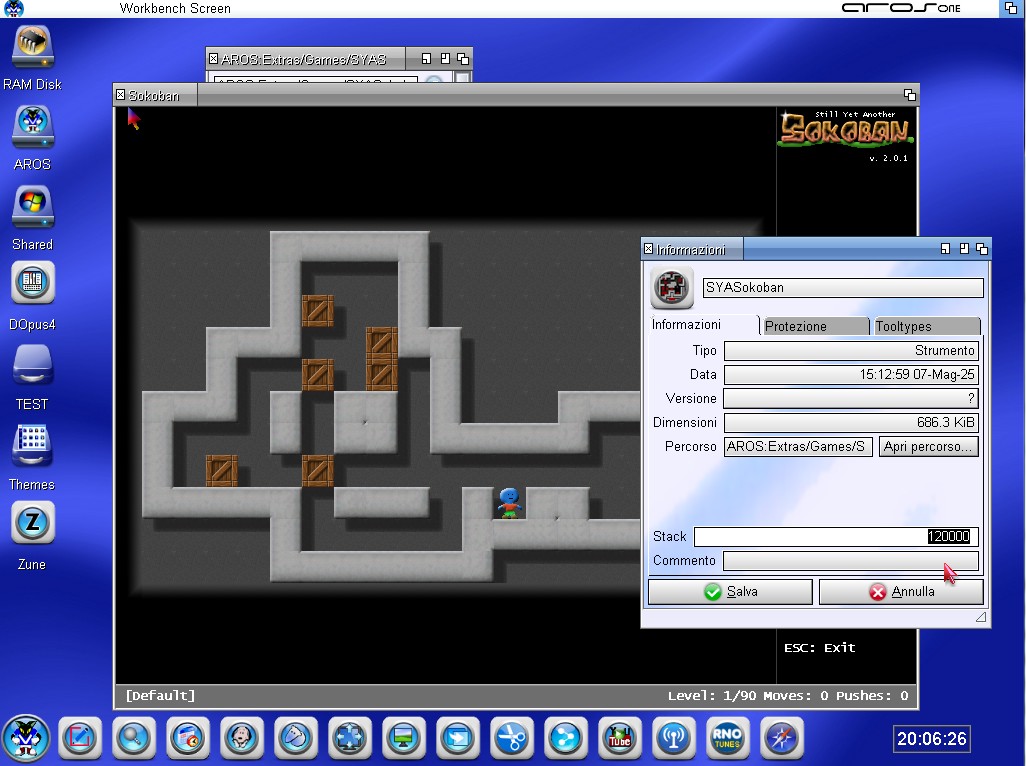
1 year agoWhen changing the icon, I probably forgot to increase the stack. Sometimes, for some reason, the stack is low, but in this case, the problem can be solved by increasing the stack in Tooltypes Icon, see screenshot.
If you are not familiar with how to do this, go to the icon properties:
- Right-click on Icon
- Information
- Stack
AMIGASYSTEM attached the following image:
AMIGASYSTEMDistro Maintainer Posted
1 year agoI emptied it three hours ago when deadwood reported it. I only have two messages; the inbox is almost empty.
AMIGASYSTEMDistro Maintainer Posted
1 year agoThanks retrofaza, I forgot to add this change to the OWB Tooltypes, updated the OWB icon and added the 120,000 stack to Icon Dopus4. With the increased stack the Guru seems to have disappeared when Dopus4 was copying files from the Network Drive.
I remember that in the Dopus4 folder, there is a version of Dopus4 called ‘Dopus4-No-Floppy’. With this version, no Guru will appear when running on AROS Hosted Linux, but also on virtual machines where a floppy drive is not configured.
AMIGASYSTEMDistro Maintainer Posted
1 year agoI replaced the update ArosOne v1.0 to v11, fixed component that resolves regression on Ivy Bridge CPUs, Icons OWB and Dopus4 fixed, Anche Aros-One-v1.0-Fix è stato aggiornato, ripetere il fixed !
Here, however, I am attaching a small archive that includes only the three repaired components!
L'update deve essere utilizzato anche da chi ha installato il nuovo AROS One v1.1
AMIGASYSTEM attached the following file:
AMIGASYSTEMDistro Maintainer Posted
1 year agoFancyPlanet, are you sure your network is working? AmiTube, is it working?
If you have modified or replaced the fonts, as happens when you run it for the first time, you must wait for the fonts to be downloaded and installed.
AMIGASYSTEMDistro Maintainer Posted
1 year agoTry deleting/replacing the OWB folder with the one from the ISO!
Question, have you installed update 1.1?
AMIGASYSTEMDistro Maintainer Posted
1 year agoThere shouldn't be any problems, unless the fonts you add have compatibility issues.
Send me the fonts in a PM so I can run some tests too!
AMIGASYSTEMDistro Maintainer Posted
1 year agoWhere can I preview them? In any case, send me the fonts and I'll run some tests!
AMIGASYSTEMDistro Maintainer Posted
1 year agoThe fonts you sent me are not standard fonts, they are Windows executables (MZ).
Solution: in EasyRPG, choose other fonts, or search the web for equivalent but standard fonts!
On AROS One delete those fonts from the Fonts folder.

 amigamiaAdmin