Oh no! Where's the JavaScript?
Your Web browser does not have JavaScript enabled or does not support JavaScript. Please enable JavaScript on your Web browser to properly view this Web site, or upgrade to a Web browser that does support JavaScript.

Recommended hardware

Last updated on 2 days ago
S
sonountalebanMember
Posted 2 days ago

deadwood wrote:

@deadwood - @sonountaleban

Generally yes. Assuming you don't have a setup to really capture output from serial, the capturing device will be your screen (best in VGA mode). Then debug=serial appended to grub kernel command line and custom versions of kernel with selective debug enabled trying to understand at this point in breaks. For custom kernel versions you need cross compilation from linux.

If you would like to try debugging this I can help you. Please open separate thread or contact me via Discord or email.


Thanks, I'll let you know when I'll try the serial connection. Both my MBs have the 10 pin serial port headers and I think their port ribbons are very cheap to buy.
D
deadwoodAROS Dev
Posted 3 days ago
@sonountaleban

Generally yes. Assuming you don't have a setup to really capture output from serial, the capturing device will be your screen (best in VGA mode). Then debug=serial appended to grub kernel command line and custom versions of kernel with selective debug enabled trying to understand at this point in breaks. For custom kernel versions you need cross compilation from linux.

If you would like to try debugging this I can help you. Please open separate thread or contact me via Discord or email.
S
sonountalebanMember
Posted 3 days ago

deadwood wrote:

@deadwood - Unfortunatelly if it dies so early, I'd have to have that hardware to diagnose.


How do you do usually that kind of debugging? Do you use a debug version of the kernel that sends output to a serial port?
A
Amiwell79Distro Maintainer
Posted 3 days ago
ok deadwood i understand
D
deadwoodAROS Dev
Posted 3 days ago
If there is no option to use Legacy BIOS, only UEFI, in this Z440 then it is not a valid computer for ABIv11 64-bit. 2026.09 release will not support that and I'm not planning on working on enabling that. There are plenty of cheap and powerful boards where Legacy BIOS can be abled.
A
Amiwell79Distro Maintainer
Posted 3 days ago
You can also buy it with payment in three installments with Klarna. I’ll try to get one, and if I manage to install ARoS well, otherwise I’ll wait for new updates.
A
Amiwell79Distro Maintainer
Posted 3 days ago
I had an HP Z440 but it's a more advanced computer than the HP Z400, it uses UEFI and I couldn't install AROS, only Debian, which I wasn't interested in
D
deadwoodAROS Dev
Posted 3 days ago
Unfortunatelly if it dies so early, I'd have to have that hardware to diagnose.
S
sonountalebanMember
Posted 3 days ago

deadwood wrote:

@deadwood - We are happy to certify new boards as recommended for AROS 64-bit!

The will be fully supported with the upcoming 2026.09 release.

1) We re-certify ASUS P8Z68V LX (Intel Core 2nd generation, Sandy Bridge).
2) We certify ASUS H81M-K and GA-H81M-S2V (Intel Core 4th generation, Haswell)

Tests were done with 4GB RAM, GTX 950, SATA, onboard LAN and audio.

Hardware testing is still ongoing and we expected to add some more newer boards to recommended list.


Hello,
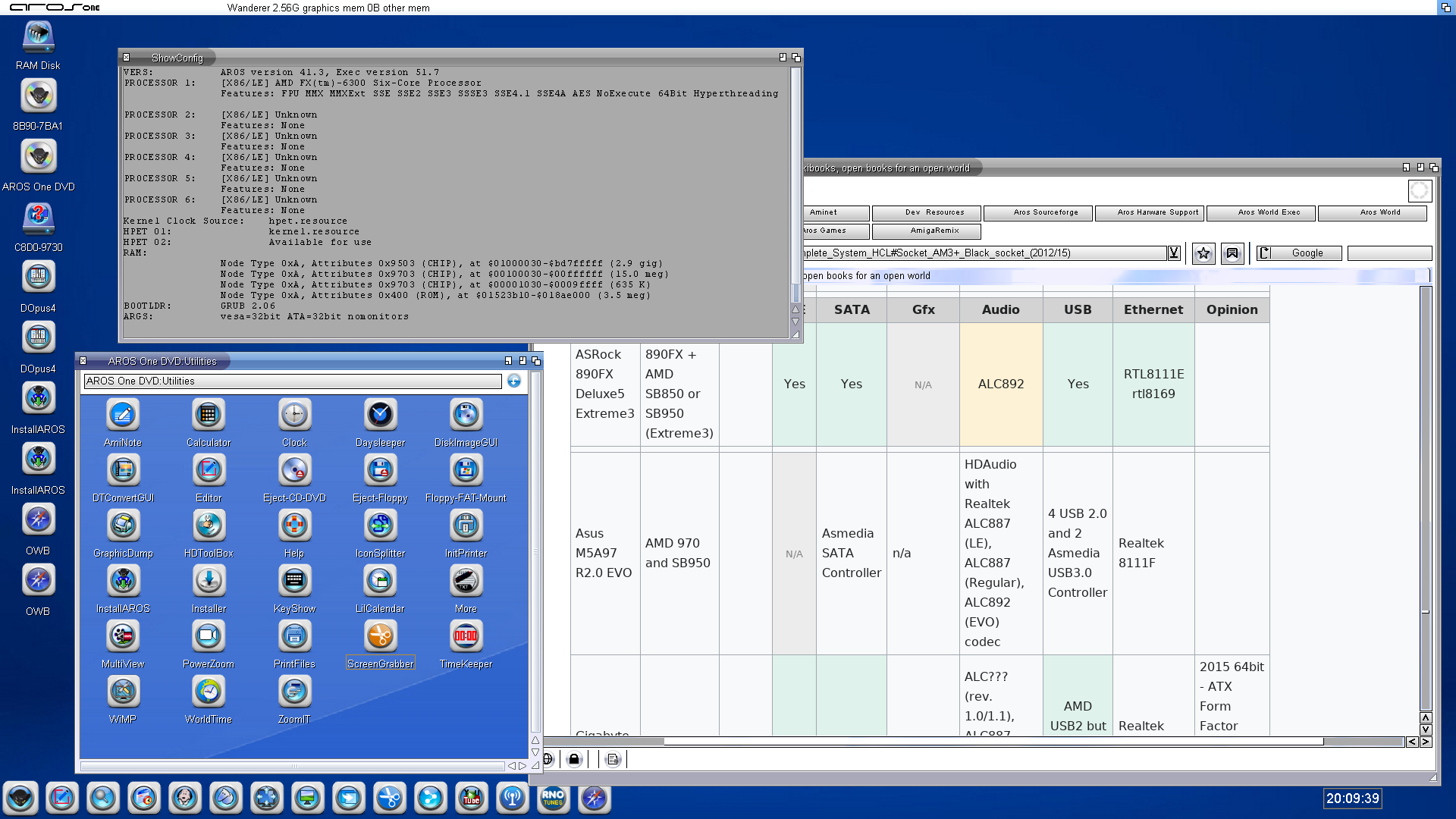
Just for information, today I tried it again on my main system (AMD FX-6300@4.4 GHz plus ASUS M5A99X EVO R2.0) and still doesn't work - basically it shut down the pc as soon as I select any item on GRUB, with whatever possible settings even in the BIOS.
However, I've given a try to the 32-bit version (AROS One 2.9) and it works: everything is fine (apart my GTX 1650 obviously), audio, network, USB 2.0 and so on. I've attached a screenshot as well as the output from PCIToolInfo.
Edited by sonountaleban on 15-08-2026 16:42, 3 days ago
sonountaleban attached the following file:
pcitoolinfo_10.zip [2.04kB / 9 Downloads]
sonountaleban attached the following image:
screenshot_2.png
D
deadwoodAROS Dev
Posted 3 days ago
@Amiwell79

I already commented on that idea in post #148.

Z400 does not support USB3 so that makes it a less likely candidate. Z440 would be better but the price is still a bit steep and like I mentioned in #148 it has the issue of ambiguity (many different models having different elements).
A
Amiwell79Distro Maintainer
Posted 3 days ago
Maybe HP Z400 with nvidia card
D
deadwoodAROS Dev
Posted 3 days ago
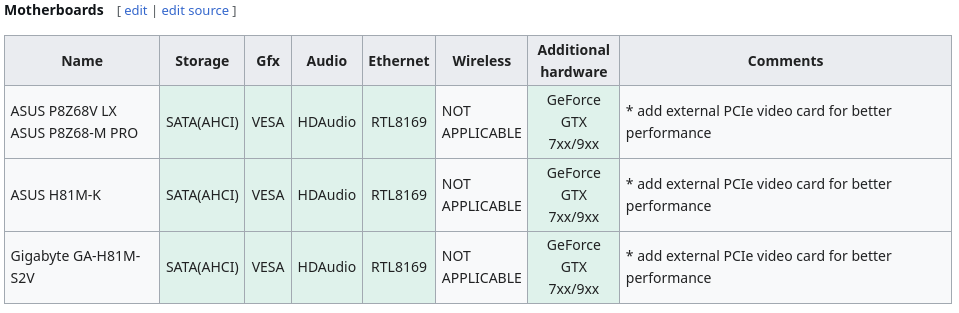
We are happy to certify new boards as recommended for AROS 64-bit!

The will be fully supported with the upcoming 2026.09 release.

1) We re-certify ASUS P8Z68V LX (Intel Core 2nd generation, Sandy Bridge).
2) We certify ASUS H81M-K and GA-H81M-S2V (Intel Core 4th generation, Haswell)

Tests were done with 4GB RAM, GTX 950, SATA, onboard LAN and audio.

Hardware testing is still ongoing and we expected to add some more newer boards to recommended list.
sonountaleban, retrofaza, aha
deadwood attached the following image:
recommended.png
J
Jeff1138Member
Posted 1 year ago
Hi,

@deadwood, just saw the recommended list got placed at the bottom of the HCL, just wondered why?

Ignore me, just saw the message about people thinking the recommended were the only good options.

Regards
Edited by Jeff1138 on 24-03-2025 04:14, 1 year ago
A
Amiwell79Distro Maintainer
Posted 2 years ago
you are welcomeLike
mazinkaesarmazinkaesarNewbie
Posted 2 years ago
thank you!
A
Amiwell79Distro Maintainer
Posted 2 years ago
this is a list of fermi card by nvidia

http://www.google...UIPk6UkCSv
R
retrofazaDistro Maintainer
Posted 2 years ago

mazinkaesar wrote:

@mazinkaesar - So I need to get an old GeForce 730 ... is anything newer better supported?


I don't think geforce gt730 is supported.

Here are the cards described in more detail:
https://en.wikibo...86_support
AMIGASYSTEMAMIGASYSTEMDistro Maintainer
Posted 2 years ago
Here you can see a list of supported and unsupported video cards:

https://en.wikibo...System_HCL
mazinkaesarmazinkaesarNewbie
Posted 2 years ago
So I need to get an old GeForce 730 ... is anything newer better supported?
A
Amiwell79Distro Maintainer
Posted 2 years ago
compatibility with nvidia graphics cards stops at the fermi chip
You can view all discussion threads in this forum.
You cannot start a new discussion thread in this forum.
You cannot reply in this discussion thread.
You cannot start on a poll in this forum.
You cannot upload attachments in this forum.
You can download attachments in this forum.
Moderator: Administrator